 EN
EN
 Dansk
Dansk  Deutsch
  Español
  Français
  Hrvatski
  Indonesia
  Italiano
  Magyar
  Nederlands
  Norsk
Norsk  Polski
  Português
  Română
  Suomi
Suomi  Svenska
  Tiếng Việt
  Türkçe
  Čeština
  Ελληνικά
  Русский
  Українська
  български
  ไทย
ไทย  日本語
日本語  简体中文
简体中文  한국어
한국어  עברית
עברית  العربية
What Is Geoblocking? Definition and How It Works (2026)

Geoblocking is a way platforms and websites restrict access to their content and services (videos, shows, movies, or music) based on your location. If you've ever tried to watch a video or access a site only to see that it is not available in your current location, then you've come across geoblocking. Platforms like Netflix, Hulu, and Pandora use it mostly due to licensing and broadcasting agreements. This goes not just for streaming services and music platforms, but also for banking apps, online shops, or social media sites.
A VPN can avoid these limitations since it provides IPs from different countries. However, not all VPNs do a good job. Some don’t have stable connections, others offer fewer server locations, and can even be unsafe. So it’s important to choose a service that is well-known in the market and offers robust protection.
What Is Geoblocking?
Geoblocking is the practice of denying or restricting access to content or a service based on your geographical location. This happens mostly because of licensing and copyright agreements that the platforms have with content holders.
Common Use Cases for Geoblocking
Geoblocking shows up in more places than streaming. Here are a few common examples:
- Streaming and music platforms. Shows, movies, live sports, or songs may only be available in certain countries due to licensing.
- Online shopping. Some stores block certain regions or limit what you can buy based on shipping, taxes, or local rules.
- Payments and fraud checks. A site may block purchases or flag transactions if the region doesn’t match the account or card.
- Banking apps and financial services. Banks may restrict logins or actions from certain countries to reduce fraud risk.
- Company tools and internal systems. Businesses sometimes limit access to work platforms outside approved countries.
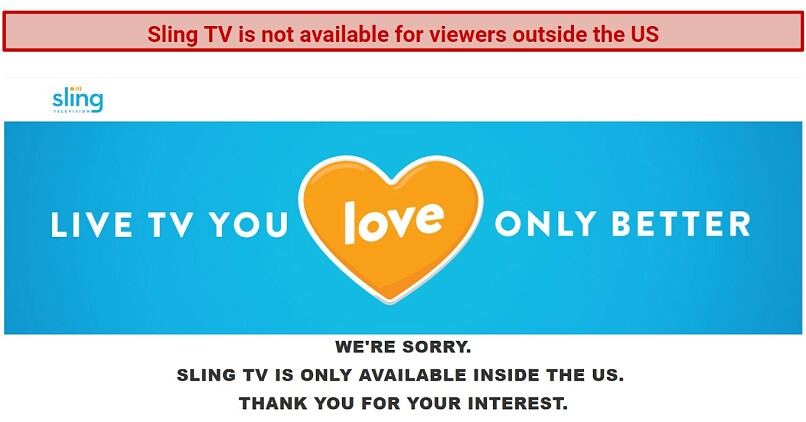 Geoblocking helps platforms like Sling TV stick to broadcasting agreements
Geoblocking vs Censorship
Geoblocking isn’t the same as censorship.
Censoring content means that a certain country has put up a firewall that restricts access to websites or apps that it deems illegal or inappropriate. A common example is China with its Great Firewall, which blocks the use of websites (like YouTube) and apps (like WhatsApp) that would otherwise be available there if it weren't for the firewall. Another example would be the UAE, which blocks porn and gambling sites.
Geoblocking (or geo-restricting), on the other hand, is based solely on where you are, and it has no relation to your country limiting access to certain content. For example, BBC iPlayer is only available in the UK, and you are blocked if you try viewing its content from anywhere else. Similarly, you can only watch Sling TV in the US. If you’re from the US and try watching its shows from abroad, you get an error message saying the site isn’t available in your location.
Geoblocking vs Geofencing
Geofencing sets a digital boundary around a real place and triggers an action when a device enters or leaves it. Businesses use it for things like local ads, in-store offers, or security alerts. In short, geoblocking controls access, while geofencing triggers actions based on location.
How Geoblocking Works
Streaming platforms and websites can work out where you are by tracking your IP address. IP addresses are unique identifiers assigned to computers and other devices using the internet. When you visit a website, your device shares its IP address, and the site can use it to figure out where you are. That way, some sites can tailor their content based on the region they see from your IP address.
Some websites also use other signals to confirm where you are, such as:
- GPS or device location services, if you’ve allowed location access.
- Payment details, like the country linked to your card or billing address.
- Account settings, including the region you selected when you signed up.
- DNS information, which can reveal your region if your device uses a local DNS service, even when your IP says otherwise.
- WebRTC data, a browser feature used for calls and video chats that can sometimes expose network details pointing to your real location.
There are 3 major reasons why these platforms use geoblocks (or georestrictions):
- Protecting licensed or copyrighted content. Streaming platforms only own the original content they produce. If they want to provide additional content for their viewers, they need to negotiate a deal with the content’s copyright holder. Each of these deals can have different requirements for how the content can be used and distributed. As a result, streaming services use geoblocking to ensure that they don’t breach the licensing agreements.
- Segmenting markets. It’s the process of dividing a market into consumer groups with similar needs and wants. For example, some shows on Netflix Japan might not be available on Netflix France because they are deemed irrelevant to French viewers. It can also be used to promote a piece of content. By premiering it in some markets first, the streaming platforms can create a sense of anticipation.
- Charging different prices by region. It’s the practice of offering the same product or service at different prices depending on the customer’s location. Geoblocking facilitates this by preventing you from signing up for a service in a marketplace of a country where the service is cheaper. For example, if you signed up for Netflix Turkey, you would pay less than for Netflix US.
How Geoblocking Is Used for Security
Geoblocking isn’t only about shows and apps. Many companies use it as a simple safety check. It helps them lower fraud and stop suspicious sign-ins. Banks and online stores do this a lot. Work tools can use it too.
Benefits of Geoblocking for Security
- Blocks risky traffic. Some regions see more fraud and fake sign-ins.
- Cuts down on abuse. It can slow down bots and repeated login attempts.
- Protects sensitive accounts. It adds an extra layer for banking, payments, and admin tools.
- Supports local rules. Some services must limit access in certain countries.
Limits of Geoblocking for Security
- It can block real users. Travel often triggers blocks or extra checks.
- Location isn’t always accurate. An IP-based location can be wrong.
- It’s not a full security plan. It won’t stop every attack on its own.
- People can still change their online location. So it works best with other checks.
Is Geoblocking Legal?
In many cases, yes. Companies often use geoblocking to follow licensing agreements, control where a service is offered, or reduce fraud. This is common with streaming platforms, online shops, and financial services.
Geoblocking rules in the EU
The EU has specific rules around geoblocking, mainly for online shopping and certain digital services. Unjustified geoblocking between EU member states is restricted, which means sellers usually can’t block access, force redirects, or change prices just because a customer is from another EU country.
The EU also has cross-border portability rules. If someone lives in one EU country and travels temporarily to another, they should still be able to use their paid subscriptions while abroad.
These rules mainly apply to online shopping and portability. They don’t require streaming platforms to offer the same content libraries in every EU country.
Outside the EU
Rules vary by country. Some geoblocks exist because of local laws, while others come from company policies. Many services set their own limits on where they operate and what content they offer in each region.
Common Geoblocking Messages and What They Mean
When a website blocks access based on your location, it usually shows a short message instead of the content. These are some of the most common ones and what they mean:
- “This content is not available in your region.” The service is restricted to specific countries because of licensing or distribution rules.
- “Service not available in your country.” The company doesn’t operate or offer this service where you’re currently located.
- “This title isn’t included in your local catalog.” Streaming libraries differ by country, so some shows or movies are missing outside certain regions.
- “Checkout not available in your location.” Online stores may block purchases based on shipping limits, pricing rules, or local regulations.
- “Access denied” or “403 error.” The site has blocked your IP address after detecting that it comes from an unsupported region.
Seeing one of these messages usually means the site has detected your location and applied a geoblock.
How VPNs Avoid Geoblocks
Some websites employ geoblocks. If they see that your IP is from an unsupported region, they restrict you from viewing their content. A VPN hides your IP address and replaces it with another one from a country of your choosing. That way, it appears as if you are browsing from that region.
However, not all VPNs can get past geoblocking. To do so, a VPN needs a large pool of IP addresses. Many low-quality VPNs have too few, so the same IP can be shared by many users. This can lead to unusually high traffic from one IP, which makes it easier for websites to spot and block it.
To stay reliable, a VPN has to replace blocked IP addresses with new ones. Premium VPNs are more likely to keep up. They also tend to offer fast speeds and plenty of servers worldwide.
Which Websites Can VPNs Unblock?
A good VPN can safely access geo-restricted banking services, social media, and news sites. The best results come from services that offer plenty of servers in different countries and consistently fast speeds. One such example is ExpressVPN.
Some countries block (or censor) certain websites and apps. Other services are only available in specific regions, so you can’t use them when you travel. Here are some common examples:
| Streaming platforms and/or online cable providers | YouTube TV, Netflix, Sling TV, Hulu + Live TV, HBO Max, Paramount+, Showtime, Amazon Prime Video, fuboTV, Disney+, RaiPlay, Digi Online, Mediaset, TV4 Play, BBC iPlayer |
| Social media platforms | Facebook, Instagram, Twitter, TikTok |
| Sports streaming websites | Fox Sports Go, ESPN, Live Soccer TV, Cricfree, SonyLiv, CBS Sports |
| Messaging apps | WhatsApp, Viber, Telegram, Signal, Facebook Messenger |
| Dating sites | Tinder, Bumble, Hinge, Grindr |
| Gambling sites | BetOnline, Bovada, El Royale |
| News sites | NY Times, WGN, Los Angeles Times, Chicago Tribune |
FAQs
Bottom Line
Geoblocking limits what you can access based on where you are. Many websites use it, but a VPN can get around those limits.
I recommend ExpressVPN for its reliability, fast speeds, and wide server coverage. It offers 3,000 servers in 105 countries and updates its IP addresses regularly to ensure they’re working. ExpressVPN also comes with a 30-day money-back guarantee*, so you can try it risk-free.
Your online activity may be visible to the sites you visit
Your IP Address:
216.73.216.52
Your Location:
US, Ohio, Columbus
Your Internet Provider:
Some sites might use these details for advertising, analytics, or tracking your online preferences.
To protect your data from the websites you visit, one of the most effective steps is to hide your IP address, which can reveal your location, identity, and browsing habits. Using a virtual private network (VPN) masks your real IP by routing your internet traffic through a secure server, making it appear as though you're browsing from a different location. A VPN also encrypts your connection, keeping your data safe from surveillance and unauthorized access.
About the Author
Obren is a former vpnMentor researcher and writer. He is a strong believer in online privacy and digital freedom.

I liked this very much, I follow you, thank you


Please, comment on how to improve this article. Your feedback matters!