 EN
EN
 Dansk
Dansk  Deutsch
  Español
  Français
  Hrvatski
  Indonesia
  Italiano
  Magyar
  Nederlands
  Norsk
Norsk  Polski
  Português
  Română
  Suomi
Suomi  Svenska
  Tiếng Việt
  Türkçe
  Čeština
  Ελληνικά
  Русский
  Українська
  български
  ไทย
ไทย  日本語
日本語  简体中文
简体中文  한국어
한국어  עברית
עברית  العربية
How to Cancel IPVanish and Get A Refund (Updated 2026)

So, you tried IPVanish, and it wasn’t for you. Maybe it didn’t have a feature you were looking for, or the speeds weren’t as fast as you expected. Now you want to cancel and get your refund before it’s too late.
No worries, I can help with that, but before we get started, there are a couple of important things to understand.
First, to get a refund for an iOS or Android subscription for IPVanish via the App Store or Google Play, you’ll have to contact those services, as IPVanish has no control over refunds given through the service.
Second, only annual subscriptions fall under IPVanish’s 30-day money-back guarantee. If you’re subscribing to IPVanish on a monthly basis, you won’t be eligible for a refund, but the instructions below can still help you cancel your current subscription.
Why Monthly IPVanish Plans Don’t Qualify for Refunds
- IPVanish limits its 30-day guarantee to longer plans. In practice, that usually means the yearly plan, not the month-to-month option.
- Monthly plans are treated as short-term billing. Once the month starts, IPVanish generally expects it to run to the end of that billing period.
- Upgrading can change which rules apply. If you switch from monthly to yearly, your refund eligibility usually follows the new yearly purchase date, not the day you first started the monthly plan.
- Plan switches don’t “undo” an old charge. If you paid for a month, changing plans later usually won’t make that monthly payment refundable.
- This is stricter than many VPNs. A lot of providers apply a 30-day guarantee to most plans, including monthly. IPVanish draws a clearer line between monthly and yearly.
- If you’re unsure, check the receipt date. Your confirmation email (or account billing page) shows what plan you bought and when. That date matters most for refunds.
The Quickest Way to Cancel IPVanish and Claim Your Refund
- Access your IPVanish account via the main website.
- Click on the Subscription tab and then press the green “I want to cancel my subscription” link.
- On the next page, scroll down and click on “I still want to cancel.”
- Enter a reason for cancellation and any comments you have, then click Continue.
- On the next page, select “I still want to cancel.”
- You will see a confirmation of cancellation and get an email confirming cancellation.
- Contact customer service to request a refund.
Step-by-Step Instructions
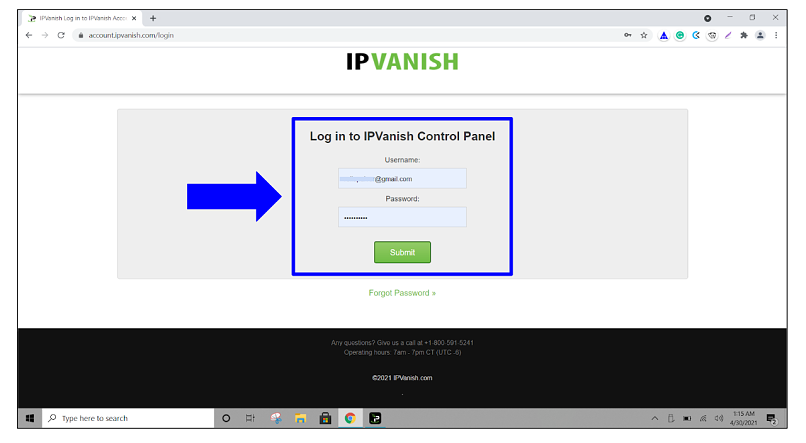
1. Open the IPVanish website and sign in with your account credentials. If you’re using your mobile device, it will redirect you to the main website.
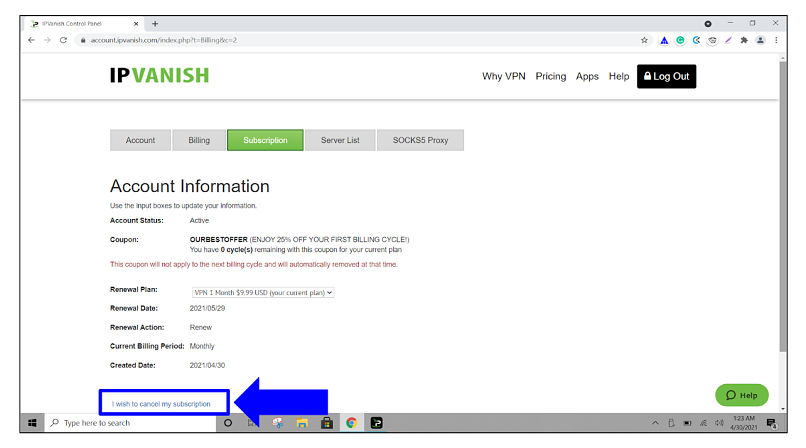
2. Next, click on the Subscription tab and press on the green “I want to cancel my subscription” link toward the bottom of the Account Information area.
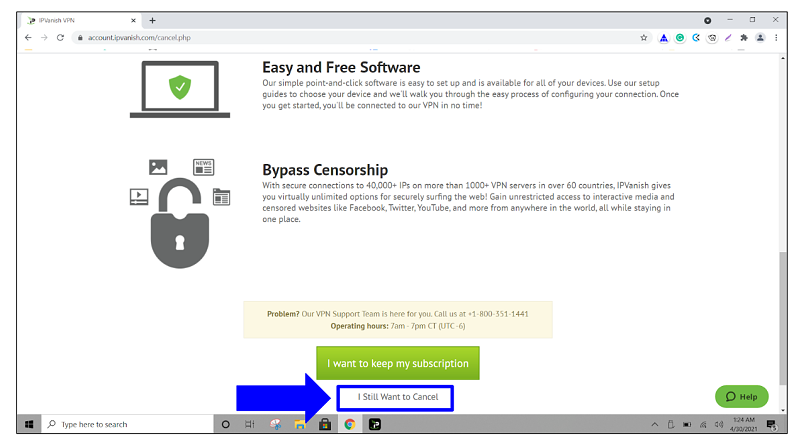
3. On the following page, scroll down to the bottom and click on the “I still want to cancel” link.
4. You will need to enter a reason for cancellation, or it won’t let you continue. Fill the appropriate button next to your issue, then enter any comments you have, and then click the green Continue button.
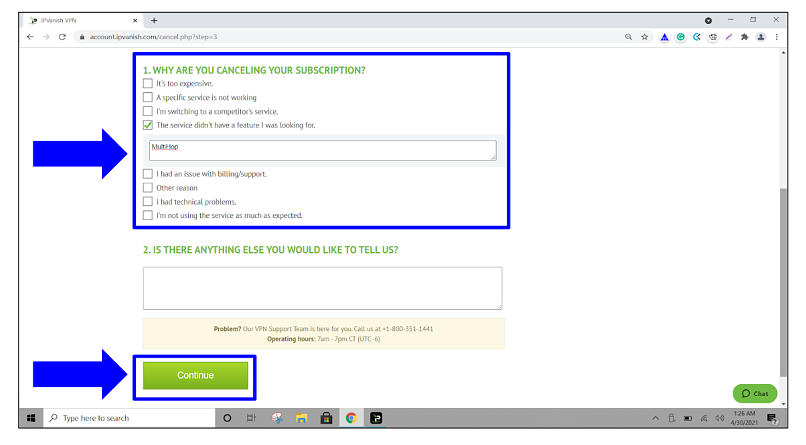
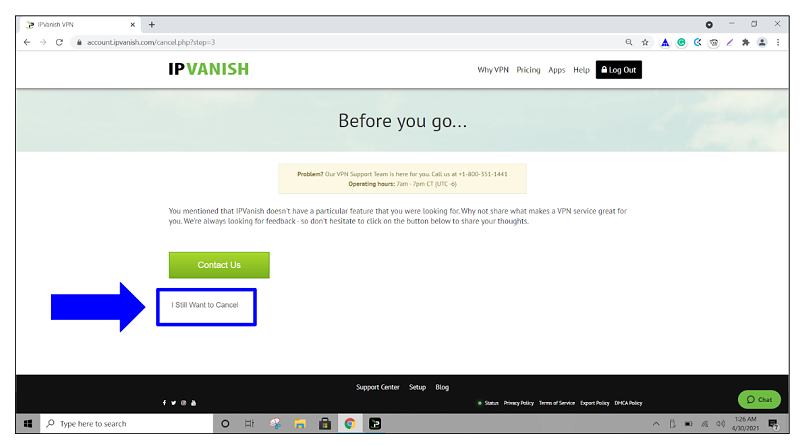
5. On the next page, click on the “I still want to cancel” link.
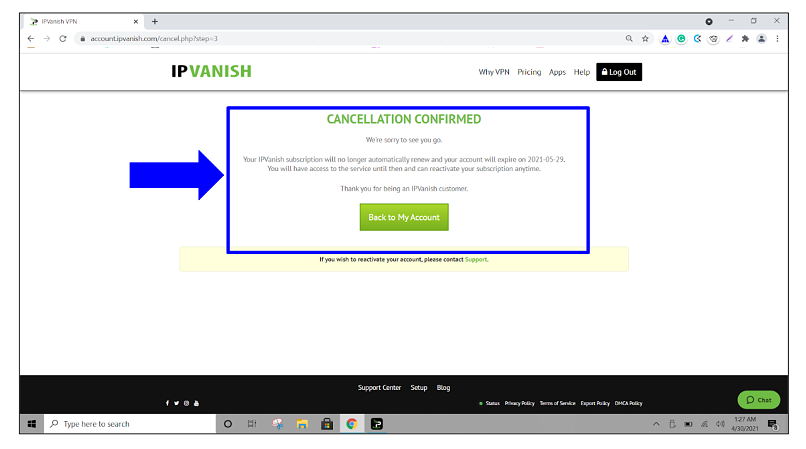
6. A confirmation window should appear, and you’ll also receive a cancellation notice by email.
7. Contact customer service, confirming the cancellation, and request your refund. Just remember, only annual subscriptions are part of the 30-day money-back guarantee.
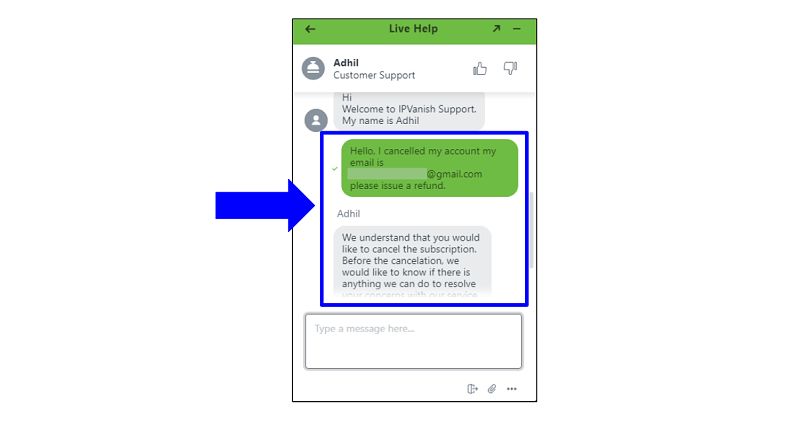
That's it! The refund is typically processed soon after approval. I asked a colleague to request a refund on IPVanish, and it was back in their account within 24-hours. I would have done this myself, but I had the one-month plan, so I was ineligible for a refund, which is why it's stressed above that only the annual plan is eligible.
What to Expect Once You Cancel IPVanish
Now that you’ve canceled your subscription, you’re going to want to find the VPN that is the right fit for you. Don’t worry, I’ve scouted out the best alternatives to IPVanish, so you won’t have to look far.
All the alternative VPNs mentioned have been tested for reliable connections, fast speeds, and usability. Plus, each one offers industry-standard security features like OpenVPN protocol and military-grade encryption, as well as a money-back guarantee.
FAQs
Am I allowed to cancel IPVanish at any time?
You’re free to cancel your IPVanish subscription whenever you choose, but a refund for the annual plan is only available during the 30-day money-back guarantee period. You can still cancel outside the window, but you won’t be eligible for a refund.
Can I get a refund if I’m past the guarantee deadline?
IPVanish may issue a refund on a case-by-case basis if you go past the first 30-day guarantee window, but there has to be an issue with the service or app itself. For instance, a malfunction on the app's end caused the service to work incorrectly. External issues, like problems with your ISP or personal devices, aren’t IPVanish’s problem and won’t be considered for a refund.
What’s the best way to contact IPVanish’s customer support?
You can contact IPVanish’s customer support via 24/7 live chat or email. I was able to get a response immediately when I asked if the one-month plans qualified for a refund, and they issued the refund for the one-year plan within 24-hours.
Is it possible to change my IPVanish plan rather than cancel?
You always have the option to upgrade your plan through your account, and IPVanish’s customer support team is there to help if you have any questions or would rather have them help you upgrade.
Bottom Line
IPVanish offers over 3,200 servers in 109+ countries, fast speeds, and stable connections, but it isn’t for everyone. With the instructions above, you can cancel your subscription and request a refund in a matter of minutes.
About the Author
Kristin is a Multimedia Visual Communications entrepreneur who worked at vpnMentor using her experience with identity access management and online security.


Please, comment on how to improve this article. Your feedback matters!