 EN
EN
 Dansk
Dansk  Deutsch
  Español
  Français
  Hrvatski
  Indonesia
  Italiano
  Magyar
  Nederlands
  Norsk
Norsk  Polski
  Português
  Română
  Suomi
Suomi  Svenska
  Tiếng Việt
  Türkçe
  Čeština
  Ελληνικά
  Русский
  Українська
  български
  ไทย
ไทย  日本語
日本語  简体中文
简体中文  한국어
한국어  עברית
עברית  العربية
 NordVPN for Torrenting: How to Torrent Safely With It in 2026

NordVPN is widely considered a strong option for torrenting thanks to its fast P2P-optimized servers and robust security features. However, it’s understandable if you have reservations. After all, its pricing is a bit expensive, and its logging policy can be unclear in places.
To find out whether it’s fit for safe torrenting, I tested NordVPN myself. I analyzed the VPN’s security and privacy features and also took a look at its server network and speeds. Lastly, I tested its device and torrent client compatibility.
I highly recommend NordVPN for torrenting. Plus, you can try it for free with its 30-day money-back guarantee. Still, there are some areas where the service is outshone by other torrenting VPNs. Below, I break down my test results and share a few tips for faster and safer downloads.
Configuring NordVPN for Secure Torrenting Across Clients
NordVPN With uTorrent
- Launch uTorrent. Then click Options and select Preferences.
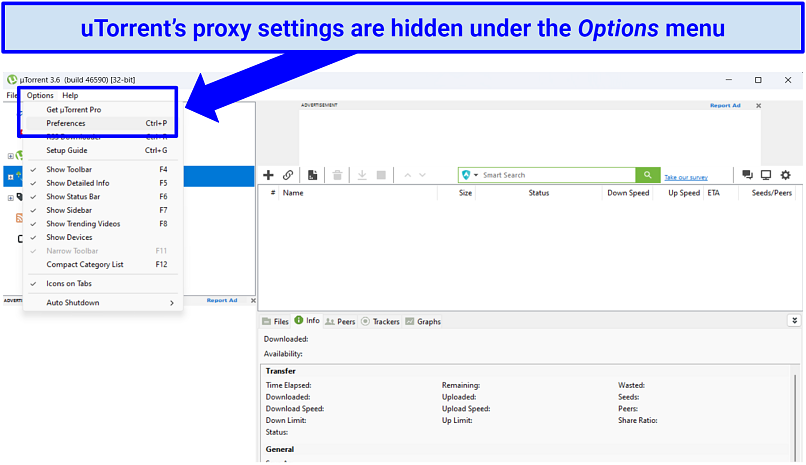 You can also press CTRL + P to immediately access the Preferences menu
 - Click on Connection. Then enable the SOCKS5 option under Proxy Server.
- Fill out the proxy field: enter NordVPN’s proxy server address (e.g. us.socks.nordhold.net).
- Change your port address: use 1080.
- Enable Authentication. Then enter your NordVPN username and password.
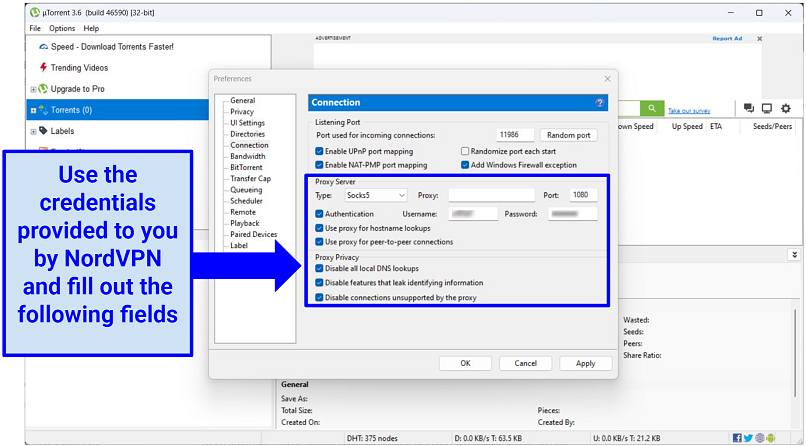 You must fill out these settings each time you want to use a new server to torrent
 - Tick the following boxes:
- Use proxy for hostname lookups.
- Use proxy for peer-to-peer connections.
- Disable all local DNS lookups.
- Disable features that leak identifying information.
- Disable connections unsupported by the proxy.
- Save settings. Click Apply and OK.
NordVPN With Deluge
- Open Deluge. Then click on Edit and Preference.
- Click Proxy. Select SOCKS5 Auth.
- Fill out the following parameters:
- Username: enter your NordVPN username.
- Password: enter your NordVPN password.
- Hostname: enter your selected NordVPN server address
- Port: 1080.
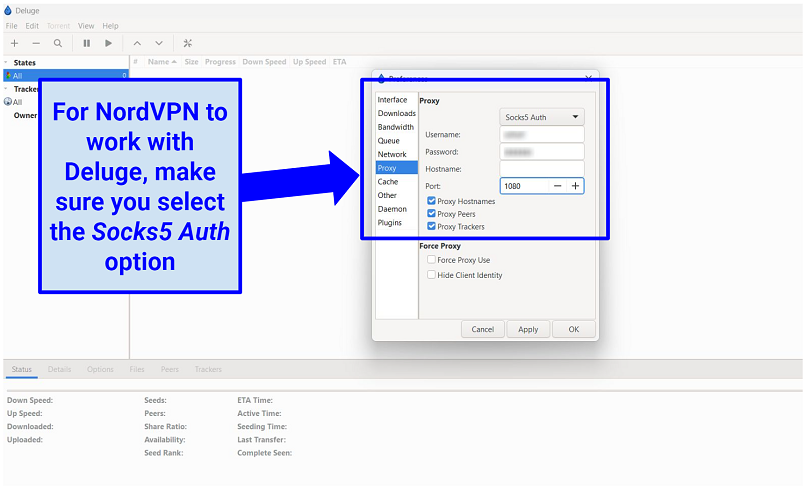 There’s no need to enable Force Proxy settings
- Tick the following boxes:
- Proxy Hostnames
- Proxy Peers
- Proxy Trackers
- Save settings. Hit Apply and Save.
NordVPN With qBittorrent
- Open qBittorrent. Then select Tools > Options.
- Click Connection. Enable SOCKS5 in the Proxy Server section.
- Enable Authentication. Tick Use proxy for peer-to-peer connections, then fill out your NordVPN username and password.
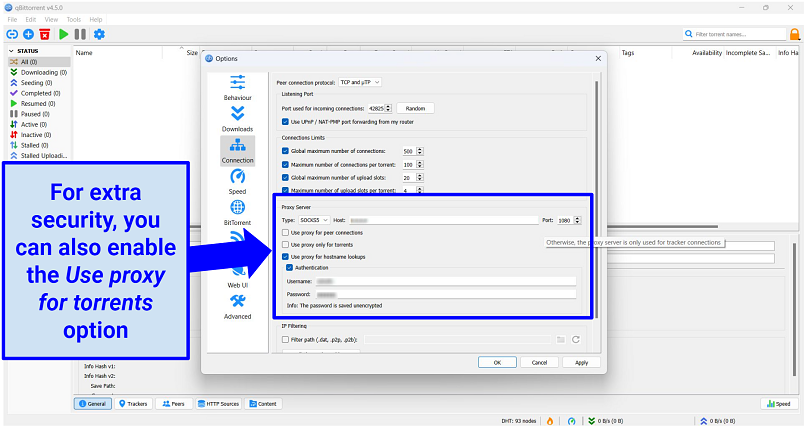 In rare cases, you’ll need to restart qBittorrent for the changes to take effect
 - Fill out the following proxy settings:
- Type: SOCKS5
- Host: (enter your selected NordVPN server address).
- Port: 1080
- Save settings. Press Apply and OK.
NordVPN for Torrenting: Detailed Performance Breakdown
I tested NordVPN in the 4 categories that are vital for torrenting. Overall, NordVPN performs well for P2P activity, with some room for improvement compared to alternative VPNs. Here are the full results:
Dedicated P2P Server Network
NordVPN has over 4000 P2P servers (while writing this). They’re optimized for high-bandwidth activities to provide reliable connections and consistent speeds for large downloads. At the time of writing, there are over 1700 P2P servers in the US alone and 500+ in the UK. In total, the P2P network covers 47 countries, including:
| Australia | Turkey | Austria | Lithuania | Iceland | Singapore | Canada | Lithuania |
| Belgium | Switzerland | Czech Republic | Slovakia | Albania | Japan | Brazil | Romania |
| France | UK | Italy | Slovenia | Portugal | Croatia | Mexico | New Zealand |
| Germany | US | Spain | Bulgaria | Luxembourg | Moldova | Chile | Israel |
| Netherlands | Denmark | Finland | Hungary | Greece | Hong Kong | Sweden | Bosnia and Herzegovina |
| Poland | Norway | Serbia | Estonia | North Macedonia | South Africa | Ireland |
The VPN conveniently groups all of its torrenting servers in the app. All I had to do was click on the P2P option in the Specialty Servers list, and NordVPN instantly routed me to the fastest torrent-friendly server for my region. To select a specific location, just click on the three dots to see a drop-down list of countries.
I had no problems using the service on various torrenting clients, including Deluge, qBittorrent, uTorrent, BitLord, and Azureus Vuze. The split tunneling feature is particularly useful. It gives you control over which apps are routed through the VPN tunnel and which bypass it. I connected to my torrent client via the VPN for safe downloads but used my banking app as normal.
NordVPN can also reliably bypass network restrictions on torrenting sites. Some networks, such as those in schools or workplaces, block access to certain torrenting platforms. But NordVPN easily evades such restrictions, allowing you access to your preferred torrent sites. Its specialized obfuscated servers can even bypass VPN-blocking firewalls.
However, one big downside is that NordVPN doesn’t offer port forwarding. Port forwarding allows data packets to be sent directly to your device, which is crucial for uploading and seeding. This means you can’t seed with the VPN. Seeding is a pretty important part of torrenting, especially if you’re trying to get a good enough ratio to join a private tracker. So it’s disappointing that this functionality isn’t supported.
Security Features and Privacy Policy
The VPN encrypts your traffic with AES 256-CBC encryption (the strongest available) and a 2048-bit strength SSL key. This makes it very hard for your ISP (or anyone else) to track your online activity. The service also masks your IPv6/DNS/WebRTC information, protecting you from cyber threats on P2P networks. I ran leak tests on 8 servers, and my real address was hidden from my swarm each time.
There’s a kill switch that blocks all internet access if the VPN disconnects (though this didn’t happen during my tests). This keeps your data from switching back to your ISP connection and exposing your torrent activity. NordVPN also has obfuscated servers that prevent ISPs from throttling P2P traffic. To enable this feature, simply switch to the OpenVPN protocol in the Settings menu.
The Threat Protection feature is great for torrenting as well. Formerly known as CyberSec, it safeguards your device from malicious or fake torrenting sites that are designed to steal your data or get you to download malware. It also blocks dodgy ads on torrent trackers and clients. I also use the auto-connect setting to launch the VPN whenever I join a new WiFi network. It means I don’t have to remember to enable NordVPN when torrenting on public hotspots.
The VPN uses private DNS servers and has a strict zero-logs policy, so your data isn’t collected or sold. My only concern was this entry in the small print:
However, NordVPN’s logging policy has been independently audited twice. PricewaterhouseCoopers AG Switzerland (PwC) confirmed that the VPN doesn’t keep any information that can link you to your activity while connected to the VPN. So, even if the service does receive a legal request for your data, it won’t have anything to hand over.
NordVPN is also based in privacy-friendly Panama, which means it isn’t subject to the strict data retention laws enacted by some other countries. Panama is outside of the 5/9/14 Eyes Alliances, too, so it’s not part of this international pact to monitor and share internet users’ data.
Great Speeds
Connected to NordVPN’s P2P servers, I measured 111Mbps which is just a 7% drop from my 120Mbps base connection. For reference, you only need 25Mbps to stream 4K content without interruptions. As a result, it took me less than 13 minutes to torrent a hefty 10GB file, which is impressively fast. In wider testing, NordVPN’s speeds were more than suitable for torrenting and streaming.
The VPN’s proprietary NordLynx protocol also gives you a speed boost. It’s built on the superfast WireGuard protocol, making it great for fast downloads. However, NordLynx isn’t compatible with the VPN’s obfuscated servers, so it depends on whether you want the best speeds or the best security while torrenting.
Supported Devices and Platforms
You can install NordVPN on most popular operating systems, including Windows, macOS, iOS, Android, Linux, and Chromebook. There’s also the opinion to set it up on your router to cover devices that don’t support VPN connections natively.
NordVPN’s NordLynx vs OpenVPN for Torrenting: Which Should You Use?
NordVPN lets you choose between NordLynx and OpenVPN. Pick based on speed or network restrictions.
Use NordLynx for the fastest downloads. It’s the best choice for most people and works well for large files.
Use OpenVPN if you’re on a restricted network. Some schools, offices, or public WiFi block VPN traffic. OpenVPN works with NordVPN’s obfuscated servers, which can help in those cases.
Quick rule:
- Stay on NordLynx if everything works.
- Switch to OpenVPN if torrents won’t connect or sites won’t load.
FAQs
Is NordVPN safe for torrenting?
Yes, you can torrent safely with NordVPN. It provides a kill switch and AES 256-bit encryption, making it hard for hackers to track you down when you torrent. There’s also IP/DNS protection and RAM-based servers that protect your data from leaking. Additionally, the service has other great features that make it great for torrenting. This includes dedicated P2P servers, a fast proprietary security protocol, and a vast server network.
What's the best NordVPN server for torrenting?
NordVPN’s P2P-optimized servers are the best for torrenting. Even though the VPN’s non-P2P servers don’t have any bandwidth limitations and allow P2P traffic, they aren’t optimized for big downloads. NordVPN's P2P-optimized servers are specially designed to transfer large amounts of data. After all, these servers were specifically designed to prevent P2P throttling and accommodate high-bandwidth activities.
What should I do if NordVPN is not working for torrenting or is slow?
There are a few things you can try if NordVPN is not working with torrents. If none of these solutions help, you can also try using an alternative VPN that has been proven to work with torrenting software.
- Connect to a new server. Sometimes the server you’re using might be overloaded with subscribers. You can check the percentage load by looking at the server list in the app. Try connecting to a P2P server or SOCKS5 to see if it improves your speeds.
- Switch your security protocol. In rare instances, your OS might conflict with the VPN’s tunneling settings. Try using the NordLynx protocol for the best speeds.
- Perform VPN diagnostics. NordVPN offers an in-app self-diagnostics system. Go to the Settings menu, then General, and click on Run diagnostics. After, just run all the available tests to see if your connection has improved or been fixed.
- Check your internet connection. Head over to speedtest.net and see if your base internet speeds are lower than expected. If lower, try using an Ethernet cable instead of WiFi to get rid of any external interference.
- Disconnect unused devices. A single NordVPN purchase lets you connect up to 10 devices simultaneously. If you aren’t using some devices, disconnect them to increase bandwidth and speeds.
- Try a new torrent. It may be that the current torrent has too few seeders or the magnet link is broken. Simply trying a new torrent for the same content may work.
- Add a firewall exception. Your device's firewall may automatically block torrent clients as a security configuration. Adding your torrent to your firewall's "Allow" list could solve the issue.
- Contact your VPN vendor. If all the above-mentioned tricks don’t work, just contact NordVPN’s customer support and ask for a solution.
Do NordVPN servers use obfuscation?
Yes, but you need to configure your connection first. The apps are set to use the NordLynx protocol by default, but NordVPN’s obfuscation feature only works with OpenVPN, so you need to select this protocol. Here’s how to do it:
- Access the Settings. Then click on the Connection option.
- Change your VPN protocol. In the VPN Protocol field, select OpenVPN UDP from the drop-down menu.
Then head back to NordVPN’s server list menu and select Obfuscated servers. You can use them to bypass VPN blocks or to hide that you’re using a VPN on private tracers (obfuscation makes VPN traffic look like regular traffic). If you're unsatisfied with the speeds, you can switch back to P2P-optimized servers.
Does NordVPN keep logs while torrenting?
No, NordVPN doesn’t keep any logs. The service has a strict zero-logs policy and RAM-based servers that prevent the company from collecting and storing your data. In addition, the VPN’s logging policy has been independently audited and verified.
Are all VPNs good for torrenting?
Not every VPN is suitable for torrenting. Torrenting is a bandwidth-intensive activity that requires a specialized server infrastructure and fast speeds.
Additionally, look for VPNs that have plenty of failsafe mechanisms, such as a kill switch and DNS/IP leak protection. This protects your IP address from accidental exposure to other seeds in a swarm.
Do free VPNs allow P2P traffic?
No, you shouldn’t. Most free VPNs or proxies lack vital security features, making them unsuitable for safe torrenting. They can also restrict bandwidth and cap your speeds so that torrenting large files is practically impossible. Plus, they usually have small server networks, which limits the torrent sites you can access. It’s safer to opt for a reputable paid VPN that comes with a dependable money-back guarantee.
Certain free VPNs have been exposed for illicitly selling user information to generate profits, while others disguise malware within their application downloads.
Summary
NordVPN is a good VPN for torrenting. It has powerful online security features to keep your downloading activities private. The service also has a dedicated P2P server network and fast speeds, ideal for torrenting large files. However, its lack of support for port forwarding is a blow if you want to use your VPN to seed.
About the Author
Ernest Sheptalo is a former Senior Writer at vpnMentor, and an expert in the field of VPNs. Ernest creates detailed reviews, comparisons, and guides that assist people in navigating the web safely, protecting their online data from theft.


Please, comment on how to improve this article. Your feedback matters!