 EN
EN
 Dansk
Dansk  Deutsch
  Español
  Français
  Hrvatski
  Indonesia
  Italiano
  Magyar
  Nederlands
  Norsk
Norsk  Polski
  Português
  Română
  Suomi
Suomi  Svenska
  Tiếng Việt
  Türkçe
  Čeština
  Ελληνικά
  Русский
  Українська
  български
  ไทย
ไทย  日本語
日本語  简体中文
简体中文  한국어
한국어  עברית
עברית  العربية
 IPsec vs. SSL VPN: Which One Is Better for You? (2026 Update)

IPsec and SSL encrypt your data, but they do it differently. They’re both popular network protocols by consumer (and remote access) VPNs. The main difference in IPsec and SSL performance from the user’s point of view is the level of security and speed.
My team and I tested 70+ VPNs to find the best-performing IPsec and SSL services. IPsec-based tunneling protocols include IKEv2, L2TP/IPsec, and SSTP, while OpenVPN uses SSL encryption. Most VPNs offer both protocols, allowing you to personalize the security settings.
ExpressVPN is my top choice for data encryption. It incorporates extra features to boost the performance of its IPsec and SSL protocols, including an extensive network of obfuscated servers to securely access the web. This service is also faster than other VPNs I tested and lets you stream in UHD with no buffering. You can test ExpressVPN risk-free as it's backed by a 30-day money-back guarantee*.
Understanding VPN Encryption
VPN encryption creates a secure line of communication between 2 or more connected devices. As each device transmits data, the VPN scrambles all the information into an unreadable format and assigns an authentication key to protect the transmission. Only the VPN host can decrypt it and relay it to the end user (recipient).
You can safely browse the internet (also on public WiFi) and do your online banking, thanks to a VPN. Hackers can't read your data even if they intercept the communication because it's chopped into random characters and cryptographically secured with private keys. So your sensitive information is well protected from snoops.
IPsec and SSL VPNs encrypt and tunnel data differently. The most significant differences include:
- The level and complexity of encryption
- Key authentication and exchange mechanisms
- Speed performance
- OSI layers where key exchange and data transfer happen
- The type of supported protocols and ports
- Ease of use
IPsec and How It Works
IPsec (Internet Protocol Security) provides advanced data protection, and is often used by businesses as well as consumers. It achieves this by encrypting IP packets sent over public IPv4/IPv6-based networks and verifying if the information source is secure. Sometimes, the encryption and verification process uses two-factor authentication (2FA) to enhance security, which requires a one-time code to log in.
There are 2 modes of securing data — transport and tunnel. The first one encrypts only the payload of an IP packet, while the second mode encrypts the entire packet (new IP header).
As such, IPsec offers high data confidentiality and integrity between the sender and receiver. It also supports network-level peer authentication, data origin authentication, and replay protection. Both users must install an IPsec client software (usually the VPN provider app) to make it work, which has to be regularly updated. For example, IPsec can be used between 2 routers to create a site-to-site VPN.
VPNs deploy IPsec-based protocols like IKEv2, L2TP/IPsec, and SSTP for secure traffic tunneling. They were introduced in the mid-1990s as a part of the TCP/IP suite (maintained by the Internet Engineering Task Force) when more remote users needed easy access to the networks. SSL solutions came later, in 1999.
SSL and How It Works
SSL (Secure Sockets Layer) is a type of encryption used to protect communications between servers and web browsers or between email clients and email servers. On the consumer side, ExpressVPN’s WolfSSL is a great example of this, providing a lightweight solution to maintain speeds.
Browser-based protocols provide safe end-to-end tunneling whenever remote users access web applications and client-server apps. For example, when you want to access an online payment website on your browser.
The most popular protocol that uses SSL encryption is OpenVPN (OpenSSL library). It supports both UDP and TCP.
Pre-installed client software isn't required for SSL authentications, but the connected device should support browsers. This makes the SSL VPNs compatible with most phones, computers, and Smart TV devices. All major web browsers (such as Chrome, Firefox, and Safari) come with SSL support.
The browser must perform a successful TLS handshake with an SSL gateway server to initiate a communication channel. TLS stands for Transport Layer Security and is the alternative modern name for SSL (the industry-standard SSL’s successor protocol since 2015), which has so far undergone many improvements. Contrary to IPsec, TLS is incorporated by default in web browsers and many other applications.
There are 2 different types of SSL VPNs. The first one is SSL Portal VPN which connects users to specific sites and acts as a portal to other web-based programs, like email or file-sharing apps. SSL Tunnel VPNs allow access to multiple sites (also the ones that aren’t web-based) through 1 port. Bear in mind that whenever you connect to SSL VPNs through your browser instead of through a dedicated app, your non-browser internet activity isn’t protected by the VPN.
In the wake of cloud-based networks and software, SSL is growing even more popular. This is because it's the most convenient and faster for web communications. The software is automatically upgraded on the server and doesn’t require user interaction.
IPsec vs. SSL VPN — Differences in Performance
There are a few differences between IPsec and SSL VPNs. Let's look closely at how these 2 perform and what their pros and cons are.
Security
While both IPsec and SSL VPNs provide secure encryption, the structural differences determine how a hacker can potentially gain access to your data. You can get maximum online protection using ExpressVPN, which offers high-end authentication with all its protocols. Here is how the IPsec and SSL VPNs compare to each other.
Authentication layers
The first key difference between IPsec and SSL is the layer where encryption and authentication happen. Based on the OSI (Open Systems Interconnection) model, computers communicate at 7 layers, namely:
- Physical layer
- Data link layer
- Network layer
- Transport layer
- Session layer
- Presentation layer
- Application layer
IPsec encrypts and authenticates internet traffic at the network layer and identifies communicating parties via their IP addresses. SSL operates at the transport layer and doesn't inspect IP packets.
The IPsec encryption is more resistant to DoS attacks than SSL/TLS because it operates at the lower network layer. Most of IPsec’s crucial security functions (like key generation) are done in the computer OS kernel, reducing cyber threat possibilities.
TLS may be easier to attack because encryption happens at the higher network layer. Also, the public cryptography used by OpenSSL/TLS systems makes them vulnerable to the Heartbleed bug that can even bypass multi-factor authentication.
Plus, SSL VPNs transport multiple circuits simultaneously — a separate circuit for each connection (contradictory to IPsec’s single tunnel circuit for all network interactions). A hacker can monitor the individual SSL circuits and get bits of data about apps or services the user is accessing. It makes this protocol more vulnerable to worm and Trojan attacks.
Key Exchange vulnerabilities
In IPsec connections, the client and server must generate a shared key (using a built-in authentication) before data transfer allowing secure verifications. However, if attackers gain access to the pre-shared key, they can eavesdrop on the information. Top VPNs take care of this problem using AES 256-bit encryption, which is virtually uncrackable and provides anti-replay protection.
SSL connections use public key cryptography (third-party integrations), so it's more difficult for attackers to find the keys. But, some VPNs don’t have secure client verification mechanisms and may even permit untrustworthy self-signed certificates. Also, SSL uses the lower DES 128-bit cipher key encryption by default.
Hackers may exploit these vulnerabilities and carry out man-in-the-middle (MITM) attacks on SSL VPNs. That’s why most SSL services integrate AES 256-bit encryption, besides 128-bit, to increase security.
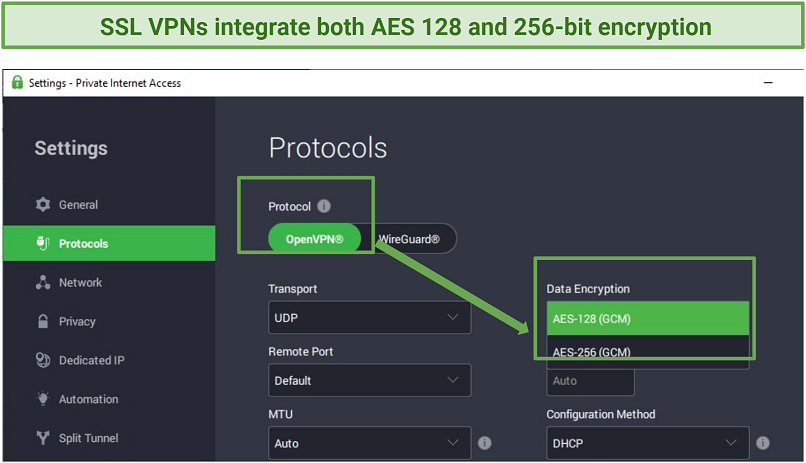 AES 256-bit encryption provides the best possible protection for IPsec and SSL VPNs like PIA
All in all, IPsec has a slight edge over SSL on the security front. Web-based applications are generally more vulnerable to malware attacks. They require frequent updating and patching so hackers can easily exploit it.
Bypassing Firewalls
Public network firewalls block threats by filtering out data packets traveling without port numbers. This is a significant advantage for SSL VPNs because they use port 443 — a safe HTTPS port recognized on most devices. Routers and hardware that use the NAT firewall can easily allow SSL traffic.
IPsec VPNs don't transport encrypted ESP packets with assigned port numbers. Firewalls can quickly flag down and block them. To curb this challenge, such VPNs encapsulate the ESP packets inside UDP packets so they can be identified with a UDP port number. The commonly used UDP port number is 4500, but it may not be recognized on most private networks.
In short, an SSL VPN is better for bypassing firewalls and geoblocks. However, most VPNs nowadays offer obfuscated servers that hide your traffic from detection. Others provide optimized servers for bypassing geoblocks on various content platforms, regardless of the protocol you use. So, an IPsec VPN might be as effective as an SSL one.
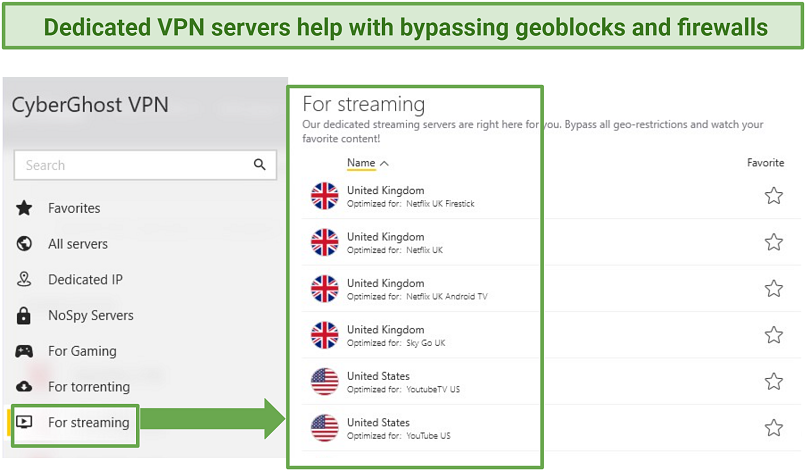 Both IPsec and SSL VPNs (like CyberGhost) provide reliable servers for bypassing geo-restrictions
Speed
When comparing which protocol is faster (IPsec vs. SSL), it's essential to consider how each connects end-users. IPsec protocols securely connect users to IP-based applications and remote networks or resources, such as printers and centralized storage. On the other hand, SSL protocols are designed to offer safe connections to web-based applications and services.
IPsec VPNs might have better speeds for VoIP communications, streaming, or when accessing remotely connected devices, like printers and storage disks.
SSL VPNs are generally faster at negotiating server or web connections — for example, it takes a shorter time to log in to an online portal. Although, the IKEv2/IPsec protocol also has a reputation for negotiating connections faster, for example, switching from phone data to WiFi.
In conclusion, both are fast, but IPsec has a fair advantage over SSL VPN because it delivers good speeds on both online and remote connections. The IKEv2/IPsec protocol can be relatively faster than SSL protocols. However, consider that a VPN's performance may be affected by many other factors, including server size, distance, and hardware quality.
When we did online speed tests, there wasn’t any significant difference between the IPsec and SSL protocols.
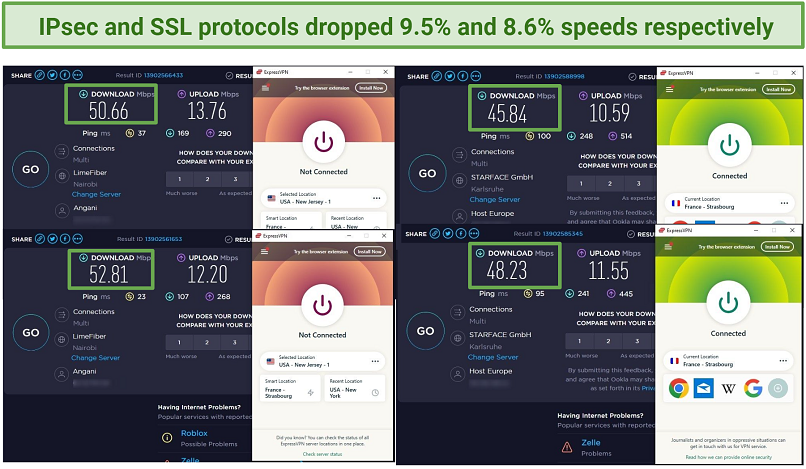 When connected to ExpressVPN’s OpenVPN protocol, our speed dropped unnoticeably — by only 9.5%
Ease of Use
SSL VPNs only require a web browser connection and don't need additional software configurations. Most internet-enabled devices already have client software for connecting to an SSL VPN.
On the other hand, IPsec VPN users must install client software or apps to initiate end-to-end communications via a shared security key. Special hardware may be required in large network operations. It can be costly to set up and administer the software through regular updates.
All in all, an SSL VPN is much easier to deploy and lower-maintenance than IPsec. However, as users can effortlessly log in from so many devices, there’s more space for various threats like viruses.
The question of when it’s appropriate to use IPsec vs. SSL VPN depends on what you want to use the VPN for. IPsec might have shortcomings where SSL works better, and vice versa — each has pros and cons.
To summarize, here are some technical feature differences between IPsec vs. SSL VPNs:
| IPsec | SSL | |
| Network Layer | Encrypts and authenticates at layer 3 of the OSI model | Encrypts and authenticates between layer 4 and 7 of the OSI model |
| Connectivity | Can connect end-point clients to remote networks, for example, office printers | Mostly used for connections on online platforms and apps |
| Key Exchange | Pre-shared key is generated using built-in authentication mechanism | Cryptographic keys are generated via public (third party) integrations |
| Transportation | May not (by default) transport data packets using port numbers | Transports data packets using port numbers |
| Implementation | Requires software installation | Doesn’t necessarily require software installation to work |
| Supported Applications | Works well with IP-based apps | Works well on browser-based apps, for example, email and file-sharing programs |
Best IPsec and SSL VPNs (2026 Edition)
These VPNs offer both IPsec-based and SSL-based protocols, so you can choose the option that best fits your needs. They’re easy to use and delivered solid overall performance in our tests.
1. ExpressVPN — Multiple Protocols (Including IPsec and SSL) for Safe and Fast Browsing
ExpressVPN supports several strong protocol choices, including IKEv2, L2TP/IPsec, and OpenVPN (TCP/UDP), which makes it useful for comparing IPsec-based and SSL-based connections in one service. In our tests, both performed reliably on desktop and mobile devices, and ExpressVPN kept speeds high, with only a 6% drop on US servers from our 50Mbps base connection.
It also combines those protocols with AES 256-bit encryption, SHA-512 HMAC authentication, and leak protection, helping maintain strong security without sacrificing performance.
2. CyberGhost — Top Encryption for Safe Web Browsing Even on Public WiFi
AES 256-bit encryption, automatic WiFi protection, and support for both IPsec- and SSL-based protocols make CyberGhost a strong fit for secure browsing on public networks. From our experience, both protocol types reached average download speeds of 45Mbps, just a 10% drop from our base connection. It also includes a kill switch and IP/DNS leak protection, which adds extra security when you connect to unfamiliar hotspots.
3. Private Internet Access (PIA) — IKEv2 and OpenVPN Protocols for Secure Torrenting on Your Mobile and Desktop Devices
Perfect Forward Secrecy, support for IKEv2 and OpenVPN, and adjustable OpenVPN encryption make PIA worth recommending if you want more control over how IPsec- and SSL-based connections are configured. Its OpenVPN protocol uses AES 128-bit encryption by default for better speeds, with the option to switch to AES 256-bit for stronger security. PIA also offers leak protection and a kill switch, and our leak tests on its US servers didn’t reveal our actual location.
4. NordVPN — IKEv2/IPsec and OpenVPN Support With Manual Setup Flexibility
Manual setup for both IKEv2/IPsec and OpenVPN makes NordVPN a strong choice if you want more protocol flexibility across different operating systems. Its setup guides cover IKEv2/IPsec on Windows, Android, and Linux, alongside OpenVPN on Windows, Android, and iOS. The native apps also include a kill switch, while the manual setup routes are useful when you need a specific protocol for compatibility or testing.
5. Surfshark — OpenVPN and IKEv2 With Broad Manual Configuration Support
Surfshark supports OpenVPN, IKEv2, and WireGuard, with manual IKEv2 and OpenVPN setup available across multiple device types. Its configuration options extend to Windows, Apple devices, Android, and some routers, which gives you more ways to use either protocol family beyond the standard app setup. That broader setup range is useful when you want more control over how the connection is configured.
Tips on Choosing the Best IPSec and SSL VPNs
Employing rigorous testing criteria, I evaluated and curated a selection of the finest IPsec and SSL VPNs. If you are in search of a reliable VPN, the following are some of the top features you should take into account:
- Strong security — A VPN with military-grade encryption is safe for browsing, whether you’re using IPsec or SSL tunneling protocols. The other essential privacy features are a kill switch, IP/DNS leak protection, and a no-logs policy.
- Fast speeds — Both IPsec and SSL VPNs have their pros and cons when it comes to speeds. However, a decent VPN delivers fast connections regardless of the protocol. This way, you can stream UHD content and play online games without interruptions.
- Global server network — Bypassing geoblocks is easier if your VPN offers many servers in different locations. They let you access multiple IP addresses to unblock content on your geo-restricted streaming accounts.
- Easy-to-use apps — Installing and connecting to servers should be straightforward on your device. Choose an IPsec or SSL VPN that doesn't require complex configurations, even when deployed for office or business use.
- Reliable money-back guarantee — Getting a VPN with a refund policy that actually pays out lets you try it with confidence.
FAQs
Is SSL better than IPsec?
Each encryption has its pros and cons. SSL can do better with web-based platforms, and IPsec is recommended when connecting to remote networks. So, the best VPNs provide both SSL and IPsec protocols to meet your different needs. To choose the better VPN for yourself, check which one offers faster speeds or more secure connections.
Is IPsec faster than SSL?
Whether you use an IPsec or SSL protocol doesn't make a huge difference. Both can be fast, depending on what you use them for. IPsec may perform better in VoIP communications, but SSL is known to negotiate connections much faster. Top VPNs offer you IPsec and SSL protocol options, so you can pick either of them. Your VPN’s performance may also be affected by several other things, like server congestion and unstable connections.
Can SSL VPNs hide my IP address?
Yes, SSL VPNs use encryption and leak protection to conceal your actual location. However, only the best VPNs offer reliable IP security features. Premium services like ExpressVPN provide high standards of online privacy. You can try such VPNs with confidence because they’re backed by trustworthy money-back guarantees.
What are the pros and cons of IPsec and SSL?
IPsec has many protection layers, while SSL offers an easy way to connect to web apps. Both VPN protocols have high compatibility, though SSL is simpler because it doesn’t need many configurations. A VPN with multiple tunneling protocols balances the pros and cons.
If you’re deploying a VPN for use in an organization, it might cost more to use IPsec due to the extra software required and maintenance expenses. SSL is much easier to implement but doesn’t offer extra safety features. Unlike IPsec, which has a built-in authentication (with 2FA), SSL depends on public third-party integrations, which can be compromised. However, SSL might be better at bypassing firewalls, especially on router devices.
IPSec-based VPN protocols lack the open source code, which might be an issue for some users. According to Edward Snowden’s allegations, the NSA targeted IPsec with vulnerabilities that spies and hackers can exploit. However, VPNs come with other security and privacy features to keep your sensitive data hidden from snoops.
When should I use IPsec vs. SSL?
SSL VPN is recommended for web-based applications and IPsec for transmitting sensitive data. For example, SSL would be appropriate for email communications and IPsec when using a mobile payment app. Either way, the best VPNs cover up the flaws of IPsec and SSL protocols, so you won’t notice significant differences. You can safely use public WiFi or stream with no buffering.
When choosing between IPsec vs. SSL, you should consider factors like user or business needs, security requirements, and the available infrastructure and resources. Many remote workers and employers need a VPN to access a company's network. It can be set up by a managed service provider (MSP).
However, nowadays, many companies have both on-premise and cloud software that require the use of both types of VPNs. IPsec runs better with traditional on-prem applications, while SSL is recommended for SaaS (Software as a Service) cloud-based apps.
It’s also easier to restrict user access (for example, to the company’s data) with SSL if necessary. That’s because SSL VPNs work by accessing specific applications, not the entire network. Access control ensures only the right people can see sensitive information. So it’s great for clients and freelance employees. IPsec is a better option for remote office team members who need full access to company resources.
In Review
When choosing between an IPsec vs. SSL VPN, it’s important to take a look into other features used to boost VPN performance. Both encryptions can be interchangeably used since there isn't much difference in security, speed, or ease of use. Most providers have optimized their VPNs to cover the flaws of each protocol so you get a good experience with either of them.
My recommended IPsec and SSL VPN is ExpressVPN. It has multiple protocols and military-grade encryption, giving you robust online protection. The servers are obfuscated too, allowing you to bypass geo-blocks and get around firewalls. Plus, it’s the fastest VPN I tested for UHD streaming. You can try ExpressVPN risk-free since it’s backed by a 30-day money-back guarantee.
Your online activity may be visible to the sites you visit
Your IP Address:
216.73.216.221
Your Location:
US, Ohio, Columbus
Your Internet Provider:
Some sites might use these details for advertising, analytics, or tracking your online preferences.
To protect your data from the websites you visit, one of the most effective steps is to hide your IP address, which can reveal your location, identity, and browsing habits. Using a virtual private network (VPN) masks your real IP by routing your internet traffic through a secure server, making it appear as though you're browsing from a different location. A VPN also encrypts your connection, keeping your data safe from surveillance and unauthorized access.
About the Author
Kennedy is a former writer at vpnMentor. He tested VPN software to give legit user experiences that help people make informed choices. Kennedy also put together detailed setup and troubleshooting guides for mobile, PC, and router devices.

Please, comment on how to improve this article. Your feedback matters!