 EN
EN
 Dansk
Dansk  Deutsch
  Español
  Français
  Hrvatski
  Indonesia
  Italiano
  Magyar
  Nederlands
  Norsk
Norsk  Polski
  Português
  Română
  Suomi
Suomi  Svenska
  Tiếng Việt
  Türkçe
  Čeština
  Ελληνικά
  Русский
  Українська
  български
  ไทย
ไทย  日本語
日本語  简体中文
简体中文  한국어
한국어  עברית
עברית  العربية
 How Does TeamViewer VPN Work? Install & Use in 2026

First, let’s make something clear. TeamViewer VPN is not a traditional VPN; it’s only designed to offer enhanced remote access between devices. Unlike actual VPNs, TeamViewer’s VPN doesn’t give you online privacy and it can’t help you access geoblocked content. It also only works on Windows.
If you’re looking for a fairly simple remote-access VPN for your business though, TeamViewer is a decent option. The following guide explains how TeamViewer VPN works and how to set it up on your PC. I’ve also listed the key features of this tool and how it can be of use to businesses.
TeamViewer VPN Features for Work & Remote Access
TeamViewer allows you to securely and remotely connect devices from other networks, allowing for more efficient IT support, file-sharing, video conferencing, and other business activities. The built-in TeamViewer VPN feature makes connected devices think they’re on the same local network. It’s more similar to a VLAN (virtual local area network), rather than true VPNs.
Here are the main features and use cases of TeamViewer’s VPN:
- Remote database access — Home workers can connect their device to business database servers, letting them run software that is reliant on this data and perform other important tasks.
- Access to remote devices — With the VPN active, you’ll be able to access external devices connected to the remote computer, such as hard drives and USB sticks.
- Remote printing — You will be able to securely print documents through printers connected to the remote computer.
- Flexible pricing — TeamViewer VPN is only available on business accounts. There are multiple plans available for different company sizes, including Business, Premium, and Corporate. Enterprises can also opt for a customized Tensor license.
How to Set Up TeamViewer VPN on Windows: Step-by-Step Guide
1. Download TeamViewer for Windows from the official website. Install the application, following the setup wizard’s instructions. You’ll also have to purchase a license here if you haven't already.
2. Once installed, go to Add computer to my TeamViewer account and click Add to set up your device.
3. Once set up, go to Settings (the gear icon) menu and click Go to this device’s settings.
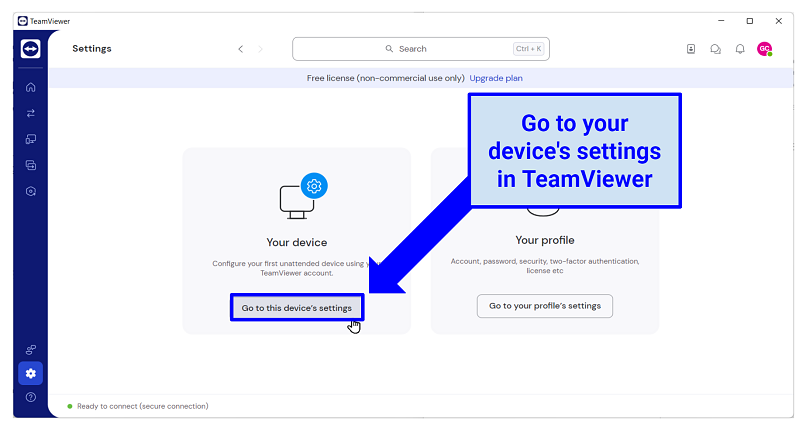 Access this menu by clicking on the Settings (gear) tab
4. Select Open advanced settings in the Advanced settings section.
5. In the Advanced tab, scroll down to Install VPN driver.
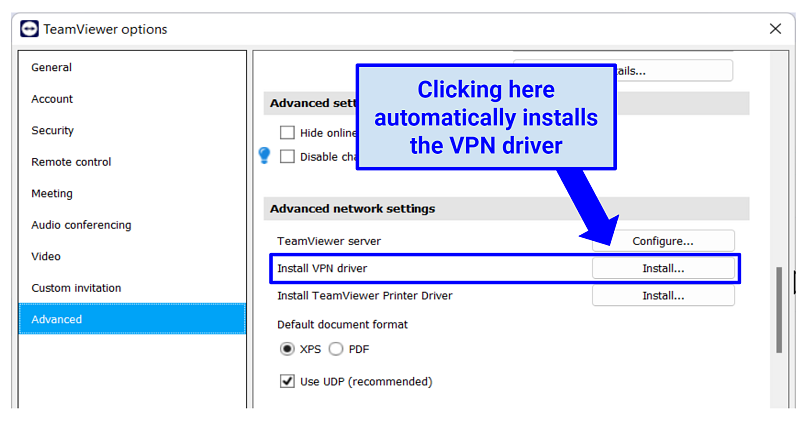 You need TeamViewer administrative rights to install the VPN
6. Select the VPN option in the Remote Control tab and click Connect. Now, you’ll be able to remotely connect to other devices using the VPN connection.
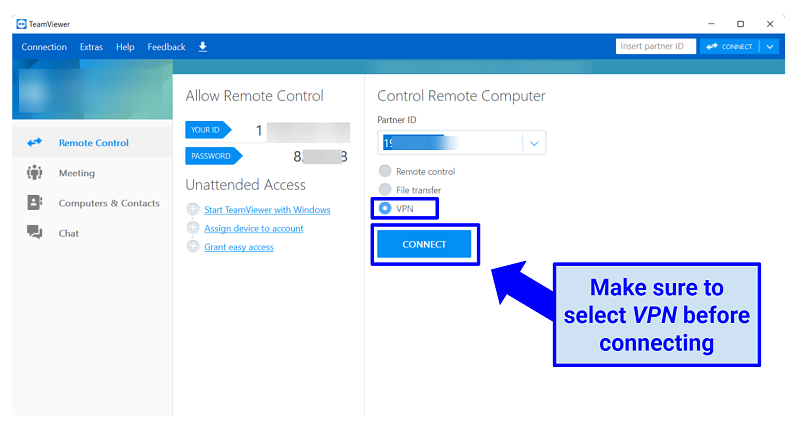 Both devices must have the VPN driver installed
What's the Difference Between TeamViewer and a VPN?
TeamViewer’s VPN creates a VLAN between the connected devices, a virtual environment where each device thinks it's on the same local network. This can be useful for some niche scenarios, primarily within business operations.
This isn’t quite the same as the services provided by ExpressVPN, NordVPN, Surfshark, and so on. Regular VPNs encrypt your internet traffic and route it through a server in a location of your choice. This offers various benefits to security, online privacy, and more.
Here are the main differences between TeamViewer’s VPN and regular VPNs:
- Private browsing. While TeamViewer does offer encryption, it’s limited solely to the communications between connected devices. You cannot use TeamViewer to browse the web with an encrypted connection. On the other hand, regular VPNs allow you to surf and use the internet with encryption — meaning no one can monitor what you do online, not even your internet service provider or network admin.
- Logging. TeamViewer actively keeps logs of connections and what happened during those connections. It’s also based in Germany, so it's obliged by law to share your personal data with authorities if requested. Real VPNs have strict zero-logs policies that mean your online activity isn’t recorded, monitored, or shared with anyone.
- Safe access to geo-restricted content. TeamViewer only lets you remotely connect to other devices on your virtual network. Regular VPNs have servers around the world that you can use to “borrow” an IP address from a different country. This new IP address masks your real one, making it look like you’re browsing from your chosen location. This lets you securely access your favorite sites and services from anywhere.
- Compatibility. TeamViewer VPN is only available for the Windows operating system; you can't use it on macOS, Linux, Android, or iOS. Real VPNs support all of these operating systems, along with routers, NAS devices, smart TVs, and consoles. They also support torrenting clients, unlike TeamViewer.
- Simultaneous connections. While you can use TeamViewer for free, its unpaid account doesn’t give you access to the VPN. Sadly, the business accounts that do support the feature are pricey and poor value. Even the cheapest offer only lets you connect 3 devices at once. Meanwhile, industry-leading VPNs allow for many simultaneous connections from a single account — for much lower prices.
- Customer support. Unless you pay for a Premium account, TeamViewer’s customer support offering is pretty poor. Most regular VPNs have 24/7 live chat reps you can get help from, even without signing up.
FAQs
Is TeamViewer better than RDP (Remote Desktop Protocol)?
TeamViewer is easier to use and offers more features than RDP. Unlike RDP, it doesn't necessitate port forwarding or firewall configuration. In addition to remote access, TeamViewer offers a built-in VPN (on Windows) and other advanced features, including file transfer, multiple platform support, and video conferencing.
That’s not to say that TeamViewer is without its faults. File transfers can be slow, with some users reporting capped speeds on large files. The software also requires constant updates, which can quickly become irritating. Finally, the free version limits you to a meeting size of 5 people and isn’t permitted for commercial use.
Is TeamViewer VPN safe to use?
Mostly, but it lacks some security features. The platform uses AES 256-bit encryption to secure the connections between remote devices. However, it doesn’t encrypt your internet traffic and actively logs your activity within the software. Only reliable VPNs with military-grade encryption and no-logs policies keep your data private.
Not only that, but TeamViewer itself has also experienced some serious breaches and cyber attacks. The company claims it has always been able to patch any vulnerabilities before they could be exploited by hackers. However, some customers have reported unauthorized access to their devices and even their financial accounts in the past.
What are the best TeamViewer alternatives for remote desk access?
Popular alternatives include NordVPN’s Meshnet, Splashtop, AnyDesk, LogMeIn, GoToMyPC, and RustDesk. They support all popular operating systems and have many extra features. Additionally, you can use a regular VPN to enhance online security alongside any remote desktop tool.
The instant messaging service Slack also lets you grant remote access to your device, although its features are a bit more limited than dedicated remote-access software.
Why is TeamViewer not working for me?
Try updating or reinstalling the TeamViewer app and built-in VPN driver to fix connection problems. If you’re looking for help with online privacy or bypassing geoblocks though, TeamViewer won’t work at all. You need a traditional VPN to enjoy these benefits.
Here are some other fixes you can try if you’re having issues with the TeamViewer software:
- Reduce screen resolution. TeamViewer may fail to work if the screen resolution of the remote device isn’t compatible with the host device.
- Adjust your firewall or antivirus settings. You can try turning off your firewall or antivirus program to see if it’s blocking TeamViewer.
- Update your operating systems and TeamViewer. Ensure the host and remote device are running on up-to-date operating systems. TeamViewer itself also requires frequent updates.
- Check your system's date and time. Incorrectly set system time or date are a common cause of issues (especially on Linux).
- Install TeamViewer via an APK on Android. Sometimes Google Play may list an outdated version. Ensure you’re downloading the APK from the official TeamViewer website to avoid malware.
- Disable power-saving mode. Special device power-saving modes (Low Power Mode on iOS or Power Saving/Battery Saver on Android) can cause connection issues with TeamViewer.
Does TeamViewer work with Netflix US?
TeamViewer’s VPN can’t be used to access streaming services. Only high-grade VPNs with a global server network can securely access streaming services like Netflix US. The best VPNs can let you watch Netflix US in HD from anywhere.
Our Verdict
TeamViewer VPN lets you remotely access databases, external hard drives, and printers. However, TeamViewer’s VPN doesn’t operate like a traditional VPN — it doesn’t safeguard your online traffic and can’t help you avoid geoblocks.
About the Author
Georgii Chanturidze is a former Senior Writer at vpnMentor with a knack for VPNs, cloud services, and anti-malware tools. He researched and tested services for vpnMentor’s readers, providing valuable information.