 EN
EN
 Dansk
Dansk  Deutsch
  Español
  Français
  Hrvatski
  Indonesia
  Italiano
  Magyar
  Nederlands
  Norsk
Norsk  Polski
  Português
  Română
  Suomi
Suomi  Svenska
  Tiếng Việt
  Türkçe
  Čeština
  Ελληνικά
  Русский
  Українська
  български
  ไทย
ไทย  日本語
日本語  简体中文
简体中文  한국어
한국어  עברית
עברית  العربية
How to Get Unbanned From Tinder in 2026: Complete Guide

You jump on Tinder, ready to swipe, only to find you’re banned. It’s like getting kicked out of the dating game before you even had a chance to play. What’s worse, it might not even be your fault. Tinder’s moderation can still flag your account unexpectedly, even if you didn’t do anything wrong.
There are practical steps you can take to restore your account and start swiping again. Tinder bans users based on their IP address and device ID, so you can get around an unfair Tinder ban by getting a different IP address and switching up your device. As a result, your activity appears fresh, making it possible to set up a new account without the previous block getting in the way. Read on to learn everything you need to know.
How Tinder Enforces Its Rules
Getting banned on Tinder can happen for various reasons, usually tied to violating its Community Guidelines or Terms of Service. Here’s what might have gone wrong:
- Explicit or offensive content. Posting explicit photos or using offensive language in your bio or messages can get you banned, as these violate Tinder’s rules for respectful behavior.
- Harassment. Threatening, abusive, or uncomfortable behavior toward other users will result in a ban, as Tinder prioritizes user safety.
- Fake accounts. Using false information, pretending to be someone else, or operating bots to automate swipes and messages are all grounds for removal.
- Spamming. Repeatedly messaging users with unwanted or promotional content may lead to an immediate ban.
- Underage users. Tinder strictly enforces its 18+ age limit. If you’re found to be underage, your account will be banned immediately.
- False reports. Sometimes, other users might report you unfairly. If Tinder receives multiple reports, its system may ban your account, even if the claims aren’t valid.
- Algorithm errors. Tinder’s automated systems can misinterpret normal behavior, like frequent swiping or messaging, as suspicious activity.
- Bot-like activity. If your actions or profile resemble patterns associated with fake accounts, Tinder may mistake you for a bot and ban you as part of its efforts to remove fake profiles.
Tinder Ban Compared to a Shadowban
If you’re having trouble on Tinder, it could be due to two types of account restrictions: a full ban or a shadowban. Understanding the difference will help you figure out your next steps.
- Tinder ban. A ban is the more serious of the two. When Tinder bans your account, you are completely locked out of the app. You’ll receive a notification informing you of the ban, and you won’t be able to log in, create a new account with the same details, or access any of your old matches or messages.
- Tinder shadowban. A shadowban is less obvious and harder to notice. Instead of completely blocking your access, Tinder limits your profile’s visibility. The app still lets you log in, swipe, and send messages, yet your profile receives little to no visibility. As a result, new matches become rare or stop entirely.
| Tinder Ban | Tinder Shadowban | |
| Account Access | Completely blocked from accessing the account | Can log in and use the app, but with limited visibility |
| Notification | You receive a clear ban notification | No direct notification; difficult to detect |
| Profile Visibility | A profile is entirely removed from Tinder | A profile is almost invisible to others |
| Match Rate | No access to matches or messages | Drastically reduced; likely no new matches |
| Causes | Severe violations (e.g., spamming, fake profiles) | Less severe issues (e.g., inappropriate language, reports) |
| Next Steps | Create a new account on a new device, appeal (unlikely to succeed) | Modify behavior, appeal, or create a new account |
How to Get Back on Tinder
Tinder bans can happen for a bunch of reasons — maybe someone falsely reported you, the algorithm made a mistake, or your profile was misinterpreted as inappropriate. These automated systems are there to keep the platform safe, but sometimes they flag genuine users by accident.
The quickest way to check is to log in like you usually would. If everything’s okay, you’ll get in as normal. But if you’re banned, Tinder will show you a message, and you won’t be able to access your account.
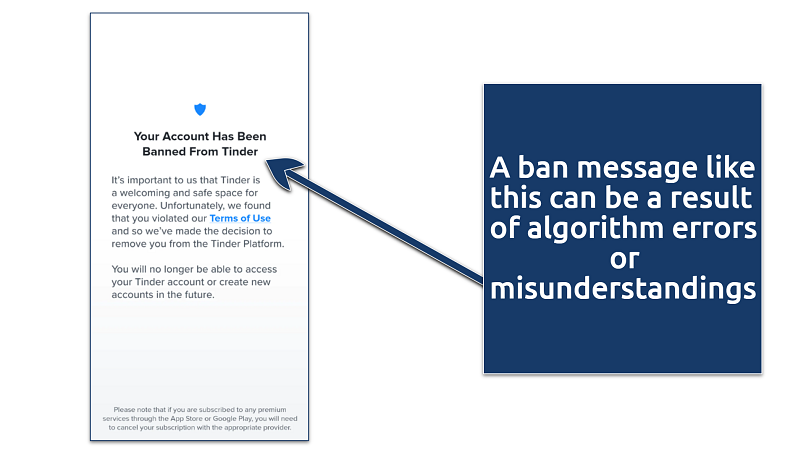 Another indicator of a banned account is the error code A40303
1. Start the Ban Appeal Process
If you believe your ban was a mistake or unjust, you can try appealing directly to Tinder. Here’s how to do it:
Step 1. Visit Tinder’s Submit a Request webpage. Under What can we help with?, select Trouble with account login.
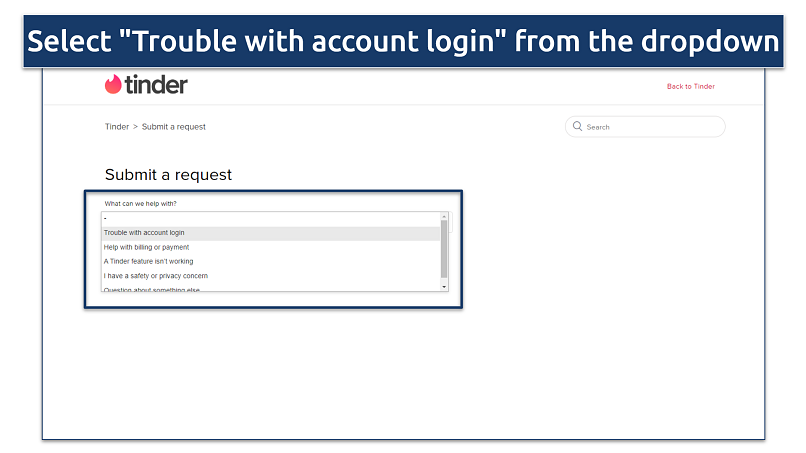 Do not send multiple requests, as it can delay verification
Step 2. In the What’s going on? section, choose My account was banned from the dropdown list.
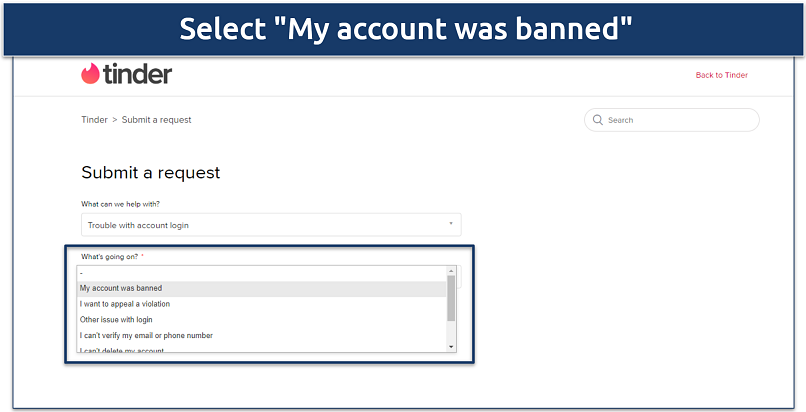 Choose the correct option to make a proper appeal
Step 3. Enter the requested information in each field. To improve your chances of getting unbanned, consider adding any supporting evidence in the Attachments section. Once you're ready, just click Submit.
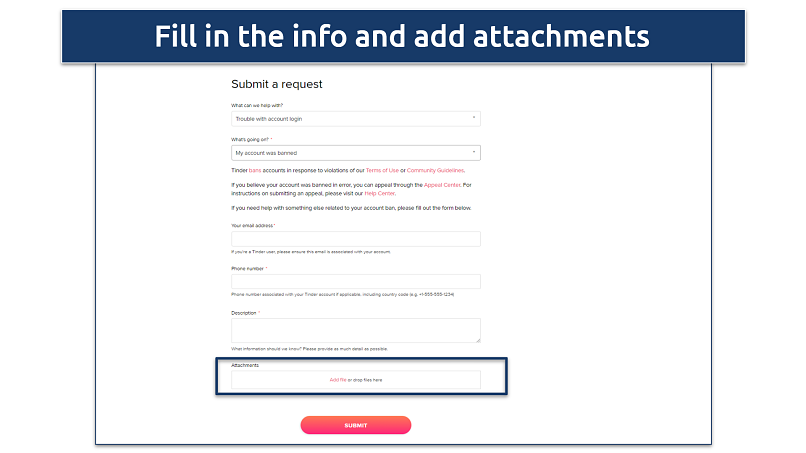 Tinder usually responds within 1–3 days via email
2. Register a New Tinder Account
If your appeal doesn't work, creating a fresh Tinder account is your next best bet. Tinder typically blocks the email, phone number, IP address, and payment methods tied to your old account, so you’ll need to start from scratch. Don’t worry — here’s a simple guide to help you set up your new Tinder account without any issues:
Step 1. First, reach out to your service provider to request a new phone number. Explain that you need to change it, and follow their instructions. It might take a little time, but this step is key to getting your new Tinder account up and running.
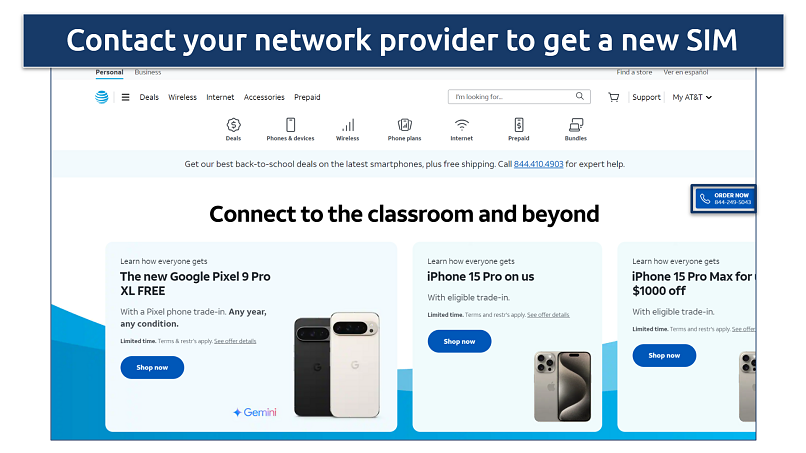 For example, the AT&T physical SIM cards and eSIM QR codes can take 2-3 days to arrive
Step 2. Create a new email address using providers like Gmail or Outlook. Make sure the address is different from the one linked to your banned account. Keep this email safe — it will be linked to your new Tinder profile.
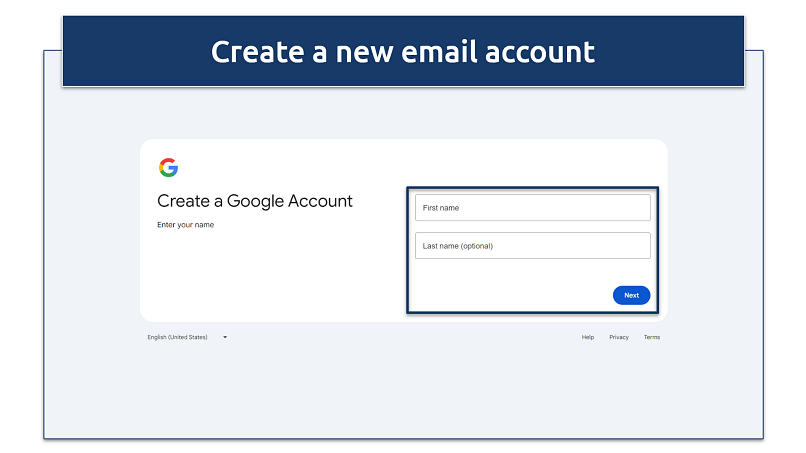 You may be asked to verify your phone number for added security
Step 3. On your device, head to Settings and tap on Apps. Find Tinder in the list and clear all data. This will wipe any leftover traces that could tie you to your old account. After that, uninstall the Tinder app. Once it's gone, reinstall it to start fresh.
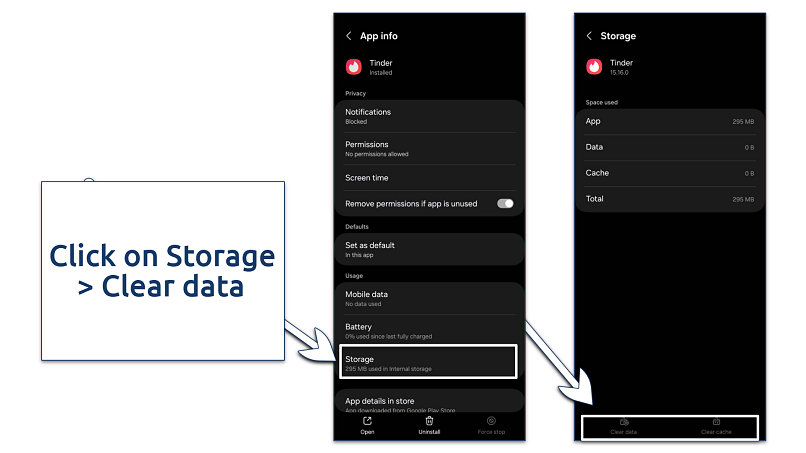 Clear Tinder's data before uninstalling to ensure a fresh start
Step 4. If you think your IP address might have been flagged, using a VPN can help. A VPN lets you change your IP address so you can avoid getting detected. It works by encrypting and rerouting your internet connection through a server in a different location, effectively masking your real IP.
Step 5. Use the new phone number and email address to sign up. Complete the verification process, which includes receiving a code via SMS. Once done, fill in your details, add some photos, and write a bio.
Also, make sure to change your photos to avoid getting banned again (or at least remove EXIF data from your photos). Take your time with this step to ensure your profile looks genuine and isn’t misinterpreted as inappropriate. A hard reset of your Tinder profile may help circumvent previous bans or shadowbans.
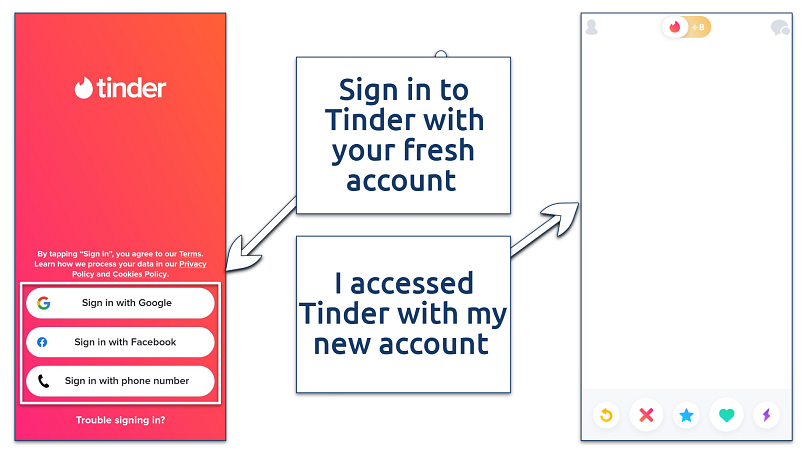 Remember to always use a VPN to mask your actual IP address
3. Use Tinder on a Private Browser
Got a new email and phone number but still can’t use Tinder because your account keeps getting blocked? It’s probably your device that Tinder has flagged. The good news? You can bypass this by using a private browser instead of the app. Here’s how:
Step 1. Download a privacy-focused browser like DuckDuckGo or Tor from your device’s app store. These browsers help prevent tracking, giving you a fresh start.
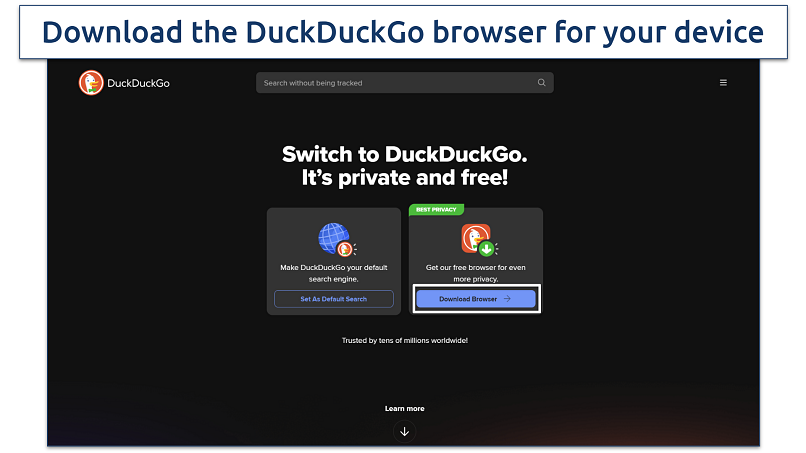 You can download the browser or use the search engine
Step 2. Instead of using the app, go directly to Tinder’s website through the browser. This method bypasses the app, reducing the chances of your device getting flagged again. Now, sign up for a new Tinder account using the email and phone number you recently obtained.
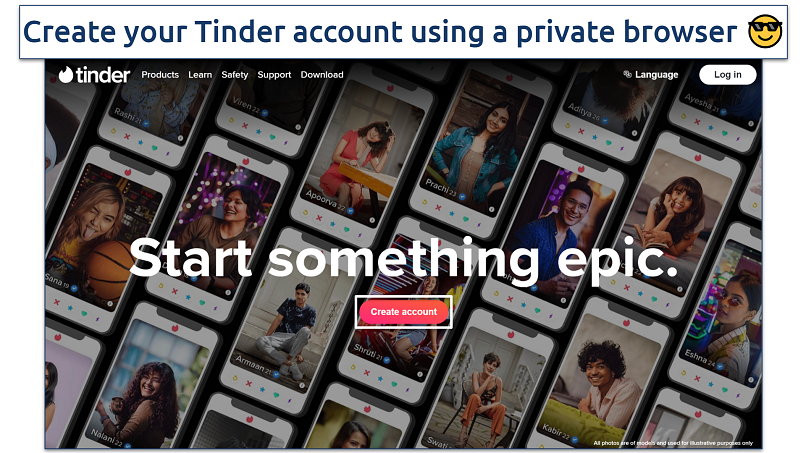 The whole process should take just a few minutes
Step 3. Now that your account is set up in a private browser, use Tinder carefully. Avoid actions like swiping too much or messaging too many users at once — these can trigger automatic bans.
4. Change Your Device ID
If private browsing doesn’t work, resetting your current device is a practical alternative to creating a new Tinder account. Resetting your device allows you to change its ID, which helps lift the device ban and ensures your new account won’t be flagged right away.
On Android
Go to Settings > General Management. Choose Reset, then Factory Data Reset, and confirm by selecting Erase All Data.
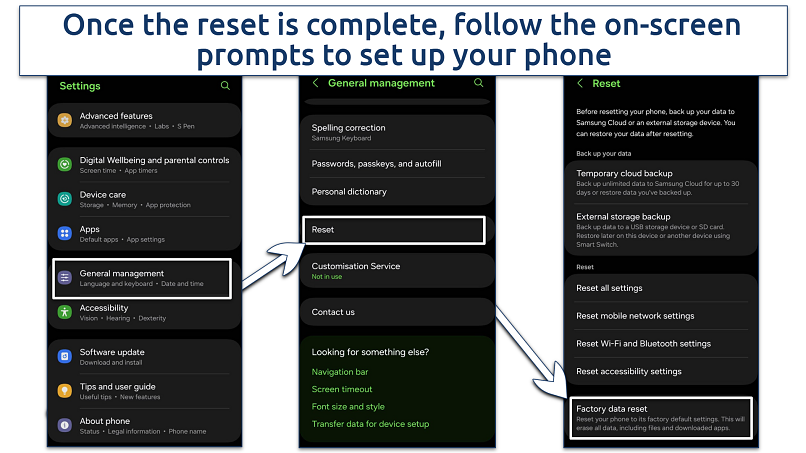 Avoid restoring apps or settings linked to your old Tinder account
On iOS
Navigate to Settings, choose General, then Transfer or Reset iPhone, and select Erase All Contents and Settings.
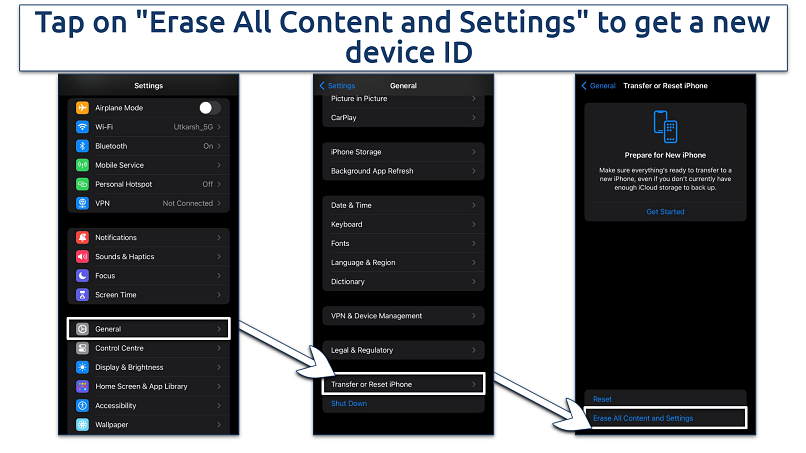 Don't interrupt the factory reset process
Important. If you're looking to change your device ID to get back on Tinder, one option is to root your Android device or jailbreak your iPhone. Rooting an Android allows you to modify system files, including the device ID, giving you a fresh start for installing Tinder. Similarly, jailbreaking an iPhone can help you achieve the same result, although it’s a more complicated process.
That said, both options come with significant risks. Rooting or jailbreaking can void your warranty, expose your device to security vulnerabilities, and even cause irreversible damage if done incorrectly. Make sure you fully understand these risks before proceeding.
5. Get a New Device
If nothing else works, switching to a new device is one of the easiest and most reliable ways to bypass a Tinder ban. That’s because Tinder often flags your device’s unique identifiers when banning accounts. By using a completely different smartphone, you’ll leave behind any traces of your old account.
Just make sure the new device — whether brand-new or second-hand — has never been used with Tinder before. Once you have it, set up a fresh Google or Apple ID to start with a clean slate. This simple step will go a long way in preventing your new account from being flagged or banned again.
Avoiding Additional Flags During the Recovery Process
If you’ve been banned from Tinder and are considering ways to get unbanned, it’s important to prioritize your safety and privacy during the process. Keep these precautions in mind as you work to restore your account:
- Contact Tinder support. Contact Tinder’s customer support through its official website or app. Clearly explain the situation through an appeal, providing any evidence that shows you were wrongly banned. You can also call them at 214-853-4309.
- Avoid third-party services. Do not use third-party services or apps that claim they can get you unbanned. These are often scams that can compromise your personal information or make the situation worse.
- Protect your account details. When communicating with Tinder support, ensure you only provide the necessary information. Don’t share sensitive details like your password or complete payment information.
- Stay informed about Tinder’s policies. Familiarize yourself with Tinder’s Community Guidelines and Terms of Service to understand what behaviors are prohibited and to avoid unintentional violations in the future.
- Use a VPN for privacy. With a VPN, you can obtain a new IP address and sign up again without being flagged. That said, use a reliable VPN service that won’t store your data. Here are the best VPNs for Tinder to enhance your privacy and protect your data from getting misused.
- Secure your device. Ensure your device is free from malware or unauthorized apps that could interfere with Tinder’s functionality and lead to accidental flags on your account.
Ways to Stay Off Tinder’s Ban List
To help you stay on the right side of Tinder’s policies and keep your account secure, consider the following guidelines:
- Keep it respectful. Always treat other users with respect. Avoid using offensive language and avoid making anyone feel uncomfortable or harassed. Remember, what might seem like a harmless joke to you could be taken the wrong way by someone else.
- Stay honest. Be truthful about who you are. Don’t create fake profiles or use someone else’s photos. Tinder has systems in place to detect and ban fake accounts, so honesty is the best policy here.
- Avoid spamming. Don’t send out mass messages or use any automated tools to swipe or chat. These behaviors can be flagged as spam, leading to a ban. Stick to genuine interactions, and you’ll be fine.
- Follow the age rules. You must be 18 or older. Tinder strictly enforces its age policy, and if you’re caught being underage, your account will be banned without a second chance.
- Be mindful of content. Post content that’s appropriate for a dating app. Avoid explicit photos or anything that could be considered offensive or against community standards. If you’re unsure, it’s better to play it safe and choose something more neutral.
- Don’t over-swipe. Swiping too rapidly or excessively might trigger Tinder’s anti-bot systems. While it might seem efficient to swipe quickly, take your time and make considered decisions to avoid any issues.
- Respond to reports quickly. If you receive a warning or notice about inappropriate behavior, address it immediately. Review what might have caused the issue and make any necessary changes to avoid a ban.
Other Dating Apps Worth Trying Instead of Tinder
If appealing your Tinder ban didn’t work and you’d rather not deal with the hassle of starting over, don’t worry — there are plenty of great dating apps to explore. Here are some top alternatives to keep your dating life on track:
- Bumble. This app puts women in control by letting them start the conversation, making it a refreshing and empowering experience. Plus, Bumble isn’t just for dating — it’s great for making friends and even networking professionally.
- Hinge. Hinge is all about fostering meaningful relationships. Its design encourages thoughtful connections over casual swiping, making it ideal if you’re looking for something long-term and serious.
- OkCupid. Known for its in-depth compatibility quizzes, OkCupid matches you based on your values and preferences. It’s perfect if you want connections that go deeper than just physical attraction.
- Plenty of Fish (POF). With a huge user base and lots of features, POF gives you plenty of options to explore different types of relationships. It’s a great choice if you enjoy variety and want to meet all kinds of people.
- Coffee Meets Bagel. This app focuses on quality over quantity by offering a curated selection of matches each day. It’s perfect for anyone who prefers a slower, more thoughtful approach to dating.
FAQs
Are Tinder bans permanent?
Tinder bans are generally permanent, especially for severe violations, such as harassment, spamming, or using fake profiles. Once banned, you typically can’t log in to your account, create a new one using the same credentials, or access your matches and messages. However, in some cases, bans might not be irreversible. Tinder allows you to submit an appeal if the ban was issued in error.
What’s the typical timeframe for getting unbanned on Tinder?
If you submit an appeal, it may take a few days to weeks for Tinder to review and respond to your case. If you’re creating a new account, you can get back on Tinder almost immediately, provided you take the necessary precautions to avoid being re-banned.
Does Tinder ban your IP address or device?
Yes, Tinder can ban both your IP address and device to prevent banned users from creating new accounts. Using a VPN can help bypass a wrongfully applied IP ban, but changing your device or altering its ID may be necessary to avoid a device ban.
What happens to my Tinder subscription after a ban?
If your Tinder account gets banned, any active subscription will usually continue unless you stop it yourself. It’s best to file an appeal first. If your account isn’t restored, go into your App Store or Google Play settings and end the subscription there so you’re not billed for a service you can’t access.
Wrapping It Up
While Tinder’s ban system is intended to maintain a safe community, it’s not without flaws. It's not uncommon to find yourself banned despite following the rules. Even so, you still have options to work toward getting your account back.
Switching to a different IP setup can allow you to return by presenting your account activity as new. In my experience, creating a new account is the most effective way to get around an unfair ban on Tinder.
About the Author
Husain Parvez is a former writer at vpnMentor, focusing on VPN reviews, detailed how-to guides, and hands-on tutorials. Husain was also a part of the vpnMentor Cybersecurity News bulletin and loved covering the latest events in cyberspace and data privacy.


Please, comment on how to improve this article. Your feedback matters!