EN
EN
 Dansk
Dansk  Deutsch
  Español
  Français
  Hrvatski
  Indonesia
  Italiano
  Magyar
  Nederlands
  Norsk
Norsk  Polski
  Português
  Română
  Suomi
Suomi  Svenska
  Tiếng Việt
  Türkçe
  Čeština
  Ελληνικά
  Русский
  Українська
  български
  ไทย
ไทย  日本語
日本語  简体中文
简体中文  한국어
한국어  עברית
עברית  العربية
Tox.Chat: Is It Safe for Secure Web Messaging in 2026

Tox.Chat (Tox) offers anonymity through decentralization, making it a popular choice if you're looking for private communication. By bypassing centralized servers, it promises to keep your conversations away from prying eyes, which is especially appealing when sharing sensitive information.
Is Tox.Chat safe? It’s estimated that 42% of the US population under 50 has used secure messaging apps1, but our tests showed that Tox.Chat by itself isn’t the safest option. That’s because it’s a peer-to-peer (P2P) network, which means your IP address is visible to others, making it easier for someone to track or target you.
A VPN adds an extra layer of privacy by masking your IP address and encrypting all internet traffic. So you can effectively hide your actual IP address from the websites or peers you're connecting to, including those on Tox, and keep your personal data private even on public WiFi.
How to Safely Use Tox.Chat
For privacy-conscious users, Tox is a strong choice, particularly for private, secure, and censorship-resistant communication. However, if anonymity is a concern, pairing it with a VPN can help mask your IP. Follow these steps to use Tox.Chat safely:
Step 1. Install a VPN and Connect to a Server
Tox is a P2P protocol, meaning your real IP address is exposed when you connect with other users. The exposed IP addresses can be used to:
- Track your locations
- Execute DDoS attacks
- Enable cyberstalking
- Facilitate identity theft
A reliable VPN hides your IP, preventing others from seeing your location and reducing the risk of tracking. While Tox already encrypts your messages end-to-end, a VPN ensures that your internet provider or network administrators can’t monitor your connection, giving you greater privacy and peace of mind while using Tox.Chat.
 Connect to any server to protect your Tox.Chat activity
Step 2. Download Tox.Chat
Visit the official Tox.Chat website and download the client for your operating system (Windows, macOS, Linux, or Android). If the download doesn’t work, you can visit the client's GitHub repository and get it there.
-
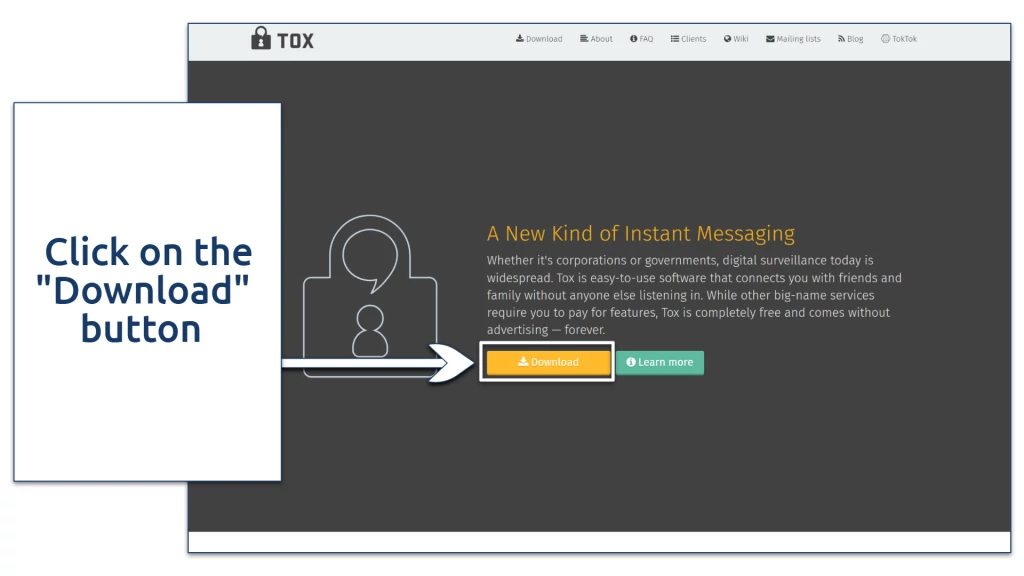
- This will take you to a different page

-
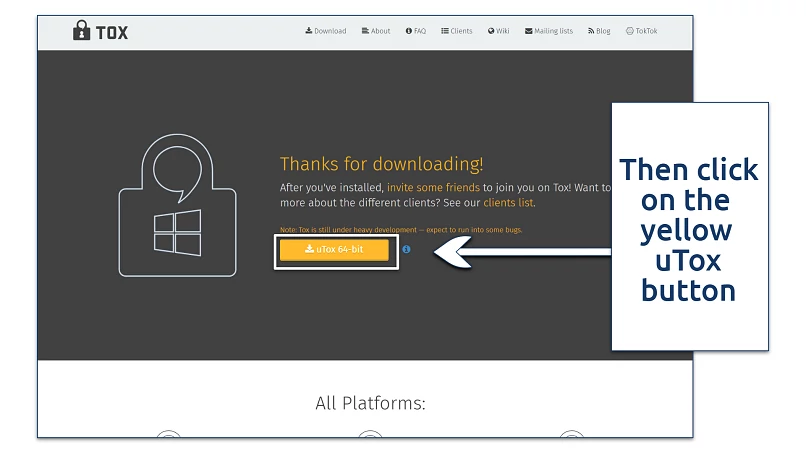
- The site automatically detects what kind of operating system you're using

Step 3. Launch the Client
Once downloaded, double-click the Tox client to launch it. If it doesn’t launch, your firewall may be blocking it. To fix this on Windows, open Windows Defender Firewall, go to Advanced Settings > Inbound Rules and create a new rule to allow the Tox client through. Then, restart the app and try again.
 Tox.Chat uses P2P connections which are blocked on most firewalls by default
Step 4. Create a Profile
Open the app and create a new profile by setting a username and customizing your settings (you don’t need an email or phone number). If you’re on mobile, this information is under the Profile settings.
 Be aware his information will be visible to all other Tox.Chat users
Step 5. Get Your Tox ID
Since Tox is decentralized, it doesn’t use usernames or phone numbers. Instead, it gives you a unique Tox ID, which works like a contact address. To add friends, simply share your Tox ID with them. If you're using a mobile device, you can find your Tox ID under Profile settings in most Tox clients.
 Tox.Chat doesn't use traditional usernames
Step 6. Add Contacts Yourself
To connect with others yourself, simply enter their Tox ID in the Search/Add Friends field. Then, wait for the other user to confirm the request.
 The recipient must confirm your request before you can start chatting
Step 7. Start Chatting
Once your contact accepts your request, you can chat, make voice or video calls, and share files securely.
What Are the Risks of Using Tox.Chat?
While Tox.Chat offers a decentralized platform for private communication, there are some risks to be aware of:
- IP exposure. While Tox.Chat offers end-to-end encryption, your IP address is still visible to other users. This poses a risk, as your exact location can be traced. Even if you trust your contacts, their devices could be compromised, exposing your IP to hackers. The risk increases with group chats and video calls.
- Network structure concerns. Tox.Chat’s decentralized peer-to-peer network promotes privacy but can expose you to risks like DDoS, malware, or spyware attacks.
- Limited moderation. As a decentralized platform, Tox lacks centralized moderation, meaning there's no reporting system for abusive content or harmful users.
- App development stage. Tox.Chat is still under development. Its own documentation warns users that the software is experimental, security is not fully proven, it should not be used in life-critical situations, and bugs and security issues may exist.
You might be considering other secure messaging apps besides Tox.Chat, but this raises an important question: Do secure messaging apps actually make you safer? The answer isn’t so clear-cut. While these apps encrypt your messages, some experts argue that they don’t do enough to conceal other identifying information, such as metadata from calls and texts2.
Even the FBI has warned about potential vulnerabilities in Signal and similar apps, suggesting that they could be exploited3. That said, secure messaging apps are still excellent tools for protecting your privacy, and I highly recommend using them.
If you want to know more about VPNs and how they enhance your online security, check out our detailed guides:
FAQs
Can I use Tox.Chat for free?
Yes, Tox.Chat is completely free. The app can be downloaded and installed on your device without providing any information, even your email address. The only issue is that secure messaging apps only encrypt the contents of your texts, so it's recommended that you use Tox alongside a VPN that offers more comprehensive protection.
Is Tox.Chat safer than Signal, Telegram, or WhatsApp?
Signal is the safest overall for most users, offering strong encryption and minimal metadata collection. Tox.Chat is more private than Signal, Telegram, and WhatsApp because it’s fully decentralized and doesn’t rely on central servers, but it exposes your IP address, making it less anonymous. That’s why it’s best to use Tox with a VPN. Telegram lacks default end-to-end encryption for group chats, and WhatsApp, despite using encryption, is owned by Meta, which raises privacy concerns.
Is there a Tox.Chat app for iPhone or Android devices?
Yes, Tox.Chat has apps for both iOS and Android, allowing you to use the platform on mobile, just like on desktop. To get started, download the app from the App Store (e.g., Antidote – Private Messenger) or Google Play (e.g., aTox), install it, and follow the setup instructions to begin private chatting on the go. Once you’ve downloaded the service, you’ll need to create a profile to start using the service.
Is my IP visible to Tox.Chat?
Yes, your IP address is visible to your contacts on Tox.Chat. Since Tox is a peer-to-peer (P2P) network with no central servers, your device directly connects to others, exposing your IP to anyone you communicate with. To hide your IP while using Tox, you can route your connection through a VPN, which masks your real IP and prevents others from tracing your location.
Can I use Tox Chat with a free VPN?
Possibly, but it's not recommended. Free VPNs have limitations like slower speeds, data caps, and fewer server options, which could affect your Tox experience. It’s a better alternative to use a premium VPN with a money-back guarantee. After all, you can’t be 100% sure that the free VPN vendor isn’t selling your data or injecting ransomware into your device.
References
About the Author
Ernest Sheptalo is a former Senior Writer at vpnMentor, and an expert in the field of VPNs. Ernest creates detailed reviews, comparisons, and guides that assist people in navigating the web safely, protecting their online data from theft.