 EN
EN
 Dansk
Dansk  Deutsch
  Español
  Français
  Hrvatski
  Indonesia
  Italiano
  Magyar
  Nederlands
  Norsk
Norsk  Polski
  Português
  Română
  Suomi
Suomi  Svenska
  Tiếng Việt
  Türkçe
  Čeština
  Ελληνικά
  Русский
  Українська
  български
  ไทย
ไทย  日本語
日本語  简体中文
简体中文  한국어
한국어  עברית
עברית  العربية
What Is Double VPN (Multi-Hop): Should You Use It (2026)

- What is Double VPN (Multi-Hop)?
- Is Double VPN Necessary or Is It Overkill?
- What Are The Advantages of Double VPN?
- What Are The Disadvantages of Double VPN?
- Best VPNs With Double VPN (Updated in 2026)
- Quick Guide: How to Set Up a Double VPN in 3 Easy Steps
- What’s the Difference Between Double VPN and VPN Over VPN
- Which is Safer, Double VPN or Onion Over VPN?
- FAQs
- Wrapping Up
A double VPN (also called multi-hop) is an advanced VPN feature that encrypts your traffic twice, providing extra protection when handling highly sensitive data. Routing your data through a single VPN server is usually enough to keep your online activity confidential. However, certain professions and companies dealing with classified information may require an additional layer of security.
Not many VPNs offer this advanced security feature. And those that do have complicated configurations. I tested multiple VPNs that double-encrypt your data and found only a few that are easy to use and won't decrease your connection speed by a massive amount.
Based on my findings, I recommend Private Internet Access. It emerged as the winner because it uses a VPN-proxy combo to conceal your IP address and keep your data safe without any complicated setup. It also comes with a 30-day money-back guarantee that lets you try PIA risk-free. If you don’t like it, the VPN will give you a 100% refund.
What is Double VPN (Multi-Hop)?
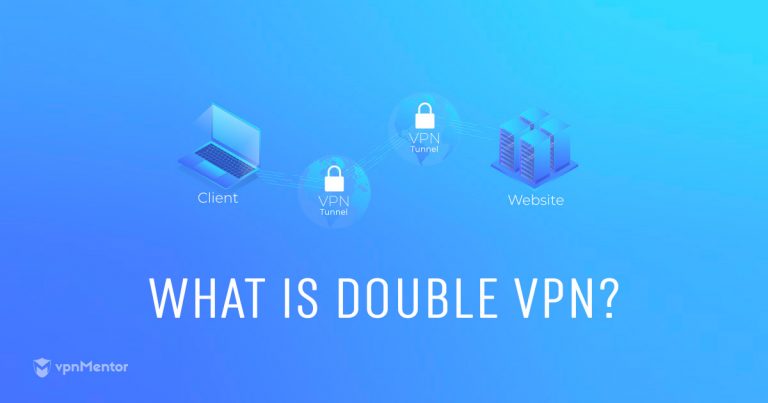
With a VPN, an encrypted tunnel is created between your computer and the VPN server. Your data is protected, and your IP address changes based on the server location the VPN connects to. A double VPN adds another secure tunnel and VPN server to the equation.
Ideally, all your traffic is then encrypted and rerouted through both these secure tunnels consecutively. This is known as VPN server cascading or chaining — the core idea behind double VPNs.
Multi-Hop VPNs are another form of VPN server cascading and have become synonymous with double VPNs. With a multi-hop VPN, you aren’t restricted to just two simultaneous VPN connections but can actually have multiple VPN connections at the same time. However, this may significantly slow down your device.
True to its name, a multi-hop VPN sends your traffic hopping through multiple servers before it exits onto the public internet. Instead of two servers, your traffic can pass through three or four servers — each additional server adds a new layer of encryption and another IP address.
2 Types of Multi-hop VPNs
- Cascade: Uses one primary VPN service and two or more of the service’s VPN servers. At every hop, your IP is changed, and your data is decrypted and re-encrypted before being sent along.
- Nested chain: Two or more different VPN services are used, with an assortment of locations. Even though this offers more robust protection, the setup is complex and requires running one VPN on top of another.
Some VPNs, such as Private Internet Access, use a server and proxy combination to route your traffic through 2 hops. In this case, the VPN encrypts your traffic and sends it to the server. The server decrypts the traffic, masks your IP, and sends it to the proxy, which doesn’t add encryption.
Instead, it changes your IP again and sends it to the destination website, which only sees the proxy IP. The server-proxy combination keeps your traffic private, but it’s simpler and slightly faster since it encrypts your data once.
Is Double VPN Necessary or Is It Overkill?
It largely depends on what you need it for. There are some circumstances where the extra security and privacy a double VPN offers can be highly beneficial:
- Safe access to websites: You can use a double VPN for YouTube, Facebook, or WhatsApp when traveling to countries with strict geoblocks, like China, and browse without limitations. Just note that non-government-approved VPNs are banned in China, so familiarize yourself with the country's rules and regulations before visiting.
- Political activism: Being involved in political work can place a target on your back, so keeping your identity safe is essential. Since a double or chain VPN masks your IP address and encrypts your data multiple times, it's harder for anyone to monitor or track you.
- Journalism: For journalists working on sensitive stories, there’s always a risk of censorship, sabotage, and personal harm. A double VPN provides the additional security and privacy you need to keep your personal information (and that of your sources) confidential.
- Public WiFi: Even though a singular VPN can usually protect your privacy while browsing using free hotspots, a double or multi-hop VPN ensures hackers and spies can't get their hands on your data.
For the average user, a multi-hop VPN is neither necessary nor worth the typical performance tradeoffs. A standard, single-hop VPN with strong encryption, DNS leak protection, and other privacy tools (malware protection, ad blocker, etc.) will provide plenty of security. A premium VPN with impressive speeds, like ExpressVPN, is a better alternative for lag-free streaming, gaming, and torrenting.
What Are The Advantages of Double VPN?
The most significant benefit of a double VPN is that it gives you stronger security and better privacy. Below are other advantages of a double VPN:
- Added anonymity: Anyone monitoring the traffic on your home network will only see the first connection to the VPN server but will not know the IP address of your destination. Additionally, the second VPN server will not know your real IP address since it will be hidden by the first VPN server. Even if this second VPN server is compromised, there is virtually no way for your traffic to be traced back to you.
- Protects against sophisticated attacks: Double VPN can protect you against correlation attacks in which the metadata of incoming and outgoing traffic is processed to reveal your IP. The multiple hops from server to server provide layers of anonymity that help protect your online identity. With every hop, the new VPN server only gets the previous VPN server’s IP address.
- Virtually uncrackable security: Your traffic is encapsulated with an additional layer of encryption for each hop it makes. No traffic, even if leaked, can be read or correlated with incoming traffic that may be observed.
- Bypassing tough geoblocks: The ability to bounce traffic between servers in different geographical locations greatly benefits anyone wishing to get around geo-restrictions. For example, if you connect to a server in Israel and then through a second server in the US, anyone watching your traffic in China will think you’re accessing Israeli sites, and anyone doing similarly in the US will think you are in Israel.
- Internet freedom: A double VPN is also helpful if you are in a country that only allows connections to a domestic IP address. First, connect to a server in that country. Then select another server outside the country through which your traffic will exit.
What Are The Disadvantages of Double VPN?
Despite its superior security and privacy, a double VPN configuration has some drawbacks that can make it unsuitable for everyday use, including:
- Expensive: Double VPNs are usually only offered by the most comprehensive, top-level VPN packages. These VPN options also tend to be the most costly.
- Compromise speeds: There is almost always a significant drop in speed when using a double VPN. Your traffic is encrypted and decrypted with each VPN server hop, and the geographic distance between servers is often large.
- Limited server choice: Most double VPNs don't allow you to choose your entry and exit server locations. Even if they do, the choice is usually limited.
- Resource-intensive: Since it has to encrypt and decrypt your data twice, a double VPN puts a huge toll on your processor. This may lead to reduced performance and quickly drain your battery.
If you choose to go with a VPN offering chained VPN connections, it's important to understand that not every VPN provider offers a fully encrypted cascade.
Many providers offering a double VPN will just forward your traffic to another VPN server without an added layer of encryption. You'll still be vulnerable to the traffic correlation attacks mentioned above. That's why it's vital to ask VPN providers exactly how their double VPN works.
Best VPNs With Double VPN (Updated in 2026)
After testing 30+ providers, I found only a few VPNs that offer double VPN in a way that’s practical, easy to use, and not overly slow.
1. Private Internet Access (PIA) — VPN-Proxy Multi-Hop With Simple Setup
PIA’s multi-hop feature is easy to enable and avoids the more complex setup of a traditional double VPN. Instead, it routes your traffic through a VPN server and a proxy, adding another hop and changing your IP again without the heavier speed loss that usually comes with double encryption. In our tests, Shadowsocks delivered the best speeds, and this setup can also make VPN traffic less obvious while staying simple to configure.
2. Proton VPN — Secure Core Routes Through Privacy-Friendly Countries
Proton VPN’s Secure Core routes your traffic through servers in privacy-friendly countries like Sweden, Switzerland, and Iceland before it reaches the final server, adding another layer of protection against surveillance and tracking. It also gives you access to 60+ server pairs and supports WireGuard, while speeds stayed relatively stable during testing, with only a 9% drop when Secure Core was enabled.
3. hide.me — Custom Entry and Exit Servers for Double VPN
hide.me lets you manually choose both your entry and exit servers, so you’re not limited to preset double VPN pairs. That gives you more control over how your traffic is routed and where it appears to come from, which is useful if you want extra privacy without giving up flexibility over location. I found that Stealth Guard also kept my real IP hidden, which added another layer of protection to its multi-hop setup.
Quick Guide: How to Set Up a Double VPN in 3 Easy Steps
- Get a VPN that supports Double VPN.
I recommend PIA for its simplicity and fast speeds by routing your traffic through a server and proxy combo using military-grade encryption. - Switch on the Multi-hop feature.
While VPNs differ slightly, most follow a similar process. Go to "Settings," click "Multi-Hop," and choose your preferences. For example, select PIA's Shadowsocks for faster speeds. - Start browsing securely.
Now, connect to a server in your chosen location and surf the web anonymously.
What’s the Difference Between Double VPN and VPN Over VPN
The main difference between double VPN and VPN over VPN is the number of providers. Double VPN means you’re using 2 servers from the same provider. With VPN over VPN, you still connect to 2 servers, but they’re from different VPN providers. You basically run 2 VPNs at the same time, each connected to a different server.
Using 2 VPNs at the same time gives you a broader server selection. You’re not limited to the server pairs offered by one provider. You can pick any of the locations each VPN offers. This makes VPN over VPN a better choice when you want extra privacy and control over your virtual geolocation.
Moreover, utilizing VPN over VPN does not impose a restriction on the number of providers you can use. You can opt for as many as you desire, provided you have sufficient bandwidth. However, it's important to note that this approach can considerably decrease your internet speeds.
VPN over VPN is theoretically safer than double VPN because different companies own each server. Even if the government compels one provider to hand over data about your online activity, you’re still safe since they don’t have access to the other server. It is even more secure when using providers based in different countries.
A major drawback of using a VPN over VPN is that the 2 VPNs need to be compatible. Otherwise, they’ll interfere with each other and block your connection. This is not a problem with a double VPN since it’s a built-in feature. You can work around the compatibility problem by installing one VPN on your router and another on your internet-connected device. However, this can be complicated, and some VPNs may not work with routers.
Another disadvantage is that it is generally more expensive than a double VPN. With a double VPN, you only need to subscribe to one VPN provider. VPN over VPN requires you to have offers with 2 or more providers, which drives up the costs.
How to Set Up 2 VPN Providers Simultaneously
You can use 2 different VPN providers (a VPN on a VPN) for maximum security. However, the process is a bit complicated. Follow the general guide below to help you do it.
- Install a virtual machine on your computer/device: Get a copy of a free virtualization tool (e.g., Hyper-V, Virtual Box) and use it to install a second operating system on a virtual machine. The operating system of your computer and the virtual machine do not have to be the same.
- Install your VPN on both systems: Install your VPN on your computer/device and your virtual machine. As this may count as two devices according to your provider, make sure you have not exceeded the number of devices supported by your VPN.
- Establish your own double VPN: Launch your VPN and connect to a server in one country. Then turn on your virtual machine. If you use hide.me’s IP checker within a browser on your virtual machine, you should see the location of the first server as that of your IP. Next, launch the VPN on your virtual machine and choose a server in a different country.
- Use your double VPN: Any traffic sent from the virtual machine will now travel through the first VPN server and then the second VPN server.
Which is Safer, Double VPN or Onion Over VPN?
Both are very secure; it depends on what you need them for because they serve different purposes. Double VPN adds an extra layer of security to your connection by routing your traffic through 2 servers and encrypting it twice. Onion over VPN helps increase security when accessing the Onion (Tor) network.
Onion over VPN can refer to 2 different things: using a VPN with Onion or a unique VPN feature. You can simultaneously use a VPN with the Tor (Onion) browser to access Onion sites for increased online protection. It may also be called Tor over VPN — Tor being the browser used to enter the network. However, “Onion over VPN” can also be a built-in feature that some VPN providers offer for additional protection when using the Onion network.
Technically, using Onion with a VPN is more secure because you’re using the VPN with the Onion/Tor network, which already encrypts your data. Onion over VPN routes traffic through a VPN server and multiple Tor nodes, encrypting it over 4 times. This makes your connection more private and less vulnerable to traffic correlation attacks. The higher the number of “hops” and nodes, the harder it becomes to tell where your traffic is coming from.
Using Onion over VPN also expands your options for selecting a VPN, as nearly any VPN can work alongside the Tor browser. This is in contrast to the double VPN feature, which is not offered by all VPN providers, thereby limiting your choices to only those that include this feature.
FAQs
Is a double VPN safer than a standard VPN connection?
Generally, a double VPN offers higher privacy compared to a standard VPN connection. It fortifies your security by sending traffic through 2 servers, usually encrypting it twice. This makes it incredibly difficult for anyone to intercept or steal your data. In addition, each server only has a partial picture of your online activities.
Can I use 2 VPNs at the same time?
Yes, it’s possible to use 2 VPNs simultaneously if they are compatible. Otherwise, they’ll conflict with each other and interfere with the connection. You can work around this by installing one VPN on your router and another on your internet-connected device. However, a much simpler approach is to use one of the VPNs that already support double VPN.
What’s the difference between a double VPN and obfuscated servers?
Double VPN sends traffic through 2 servers, while obfuscated servers mask your VPN traffic, so it isn't easy to identify that you're using a VPN. Obfuscated servers are great for bypassing firewalls and local network restrictions, such as those found at workplaces or schools. However, if you're looking for additional data security and privacy, you're better off with a double VPN.
Can I use a double VPN on Android or iPhone?
Yes, it’s possible to use a double VPN on Android or iPhone. However, you need a VPN provider that offers the feature on mobile devices. If your preferred provider doesn’t offer the feature, you can use a VPN over VPN connection by installing one VPN on your router and another on your Android or iPhone.
Wrapping Up
Although double VPNs provide an extra layer of anonymity for those who require heightened protection, a single-server VPN from a reputable premium provider will exceed the requirements of the majority of users.
However, if you think a double VPN is necessary for your job or online activities, PIA is my top recommendation. It routes traffic through a VPN and a proxy server for extra privacy without massive slowdowns. It’s also backed by a 30-day money-back guarantee, so you can try PIA without risk. If you’re not satisfied, you can claim a full refund.
Your online activity may be visible to the sites you visit
Your IP Address:
216.73.216.221
Your Location:
US, Ohio, Columbus
Your Internet Provider:
Some sites might use these details for advertising, analytics, or tracking your online preferences.
To protect your data from the websites you visit, one of the most effective steps is to hide your IP address, which can reveal your location, identity, and browsing habits. Using a virtual private network (VPN) masks your real IP by routing your internet traffic through a secure server, making it appear as though you're browsing from a different location. A VPN also encrypts your connection, keeping your data safe from surveillance and unauthorized access.
About the Author
Kelvin was a writer and cyber-safety researcher at vpnMentor, whose expertise in the latest online security tools helped readers better understand how to protect themselves from hackers and online snoops.

Please, comment on how to improve this article. Your feedback matters!