 EN
EN
 Dansk
Dansk  Deutsch
  Español
  Français
  Hrvatski
  Indonesia
  Italiano
  Magyar
  Nederlands
  Norsk
Norsk  Polski
  Português
  Română
  Suomi
Suomi  Svenska
  Tiếng Việt
  Türkçe
  Čeština
  Ελληνικά
  Русский
  Українська
  български
  ไทย
ไทย  日本語
日本語  简体中文
简体中文  한국어
한국어  עברית
עברית  العربية
 Does a VPN Work on Mobile Data in 2026? Yes, Do This.

Let’s get this out of the way straight away — yes, you can use a VPN on mobile data. However, using a VPN can increase the amount of cellular data you consume, due to the encryption process and other features that boost your privacy. So, it’s important to choose a VPN that minimizes data usage, while still securing your connection.
That’s why I curated a list of the best VPNs for cellular data. So you can work, check your mail, browse social media, and do online banking with peace of mind, knowing that your sensitive data is protected from snoops.
Does Using a VPN Use More Data?
Yes, using a VPN typically uses more data than browsing without one. Here’s why:
- Encryption overhead. One of the primary purposes of a VPN is to encrypt your data. This adds overhead because the process requires additional data to maintain the integrity and security of the packets being sent and received. Depending on the encryption protocol and the VPN service, this overhead can vary — but it generally results in a 5-15% increase in data usage.
- Tunneling protocols. VPNs work by tunneling your traffic through their servers. This involves encapsulating the original data packet inside another packet. While this is essential for routing and security, it adds a bit more to the total data size.
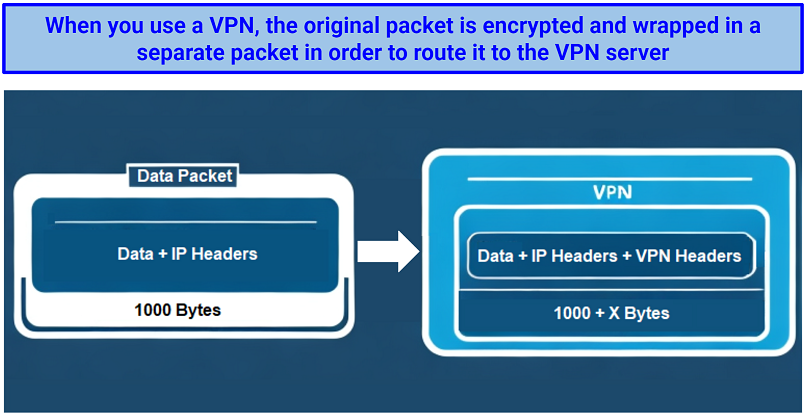 A standard data packet, when encrypted, contains extra VPN information that increases data consumption
 - Handshakes and keep-alive messages. To establish a secure connection, VPNs use a process known as a handshake. Additionally, they send keep-alive messages periodically to maintain the connection. Both of these processes consume extra data, albeit a relatively minor amount compared to actual data traffic.
If you have a data limit on your mobile plan, using a VPN could lead you to reaching that cap faster. It’s also worth noting that if you’re traveling, this may also result in higher data roaming charges than usual. The following table can help you get an idea about VPN data consumption on cellular networks:
| Activity | Without a VPN | With a VPN |
| Web browsing (per page) | 1.9MB | 2.1MB (10% increase) |
| HD Netflix Streaming (per hour) | 3.2GB | 3.6GB (12% increase) |
| 4K Netflix Streaming (per hour) | 7.1GB | 8.3GB (16% increase) |
| HD YouTube Streaming (per hour) | 2.5GB | 2.9GB (16% increase) |
It's essential to weigh the slight increase in data usage against the privacy, security, and content accessibility benefits that VPNs provide. That said, for most users, the benefits of using a VPN far outweigh the small rise in data consumption.
How to Reduce VPN Data Usage on Mobiles
If you're concerned about VPNs consuming more of your mobile data, here are several methods to mitigate the issue:
1. Pick an Efficient VPN Protocol
Different VPN protocols impact data usage differently. Here’s a table that illustrates the data overhead of several popular protocols:
| VPN Protocol | Data Overhead | Privacy & Security | Speeds |
| Lightway (proprietary to ExpressVPN) | 5.3% increase | High | Very Fast |
| WireGuard | 7.5% increase | High | Very Fast |
| IKEv2/IPSec | 9.2% increase | Medium | Fast |
| PPTP | 10.4% increase | Low | Very Fast |
| OpenVPN UDP | 13.9% increase | High | Fast |
| OpenVPN TCP | 17.1% increase | High | Moderate |
2. Use Split Tunneling
Some VPNs, like ExpressVPN, offer a split tunneling feature that lets you set only certain apps to go through the VPN tunnel, helping you save data on apps and processes where the VPN's protection isn't essential. This lets you avoid any unnecessary data consumption.
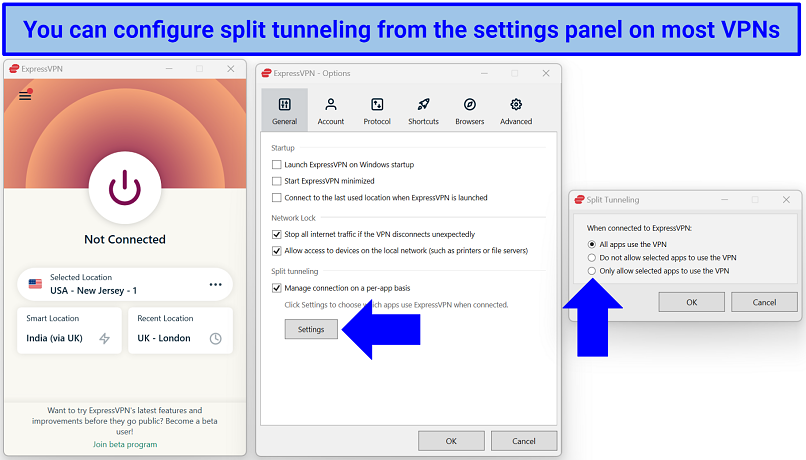 You can also configure some VPNs to only connect when certain apps are launched
3. Activate Data Compression
Many VPNs use data compression to reduce the amount sent. This is a similar concept to zipping files. While most VPNs have compression enabled by default, some may not — but you can usually activate it from the settings.
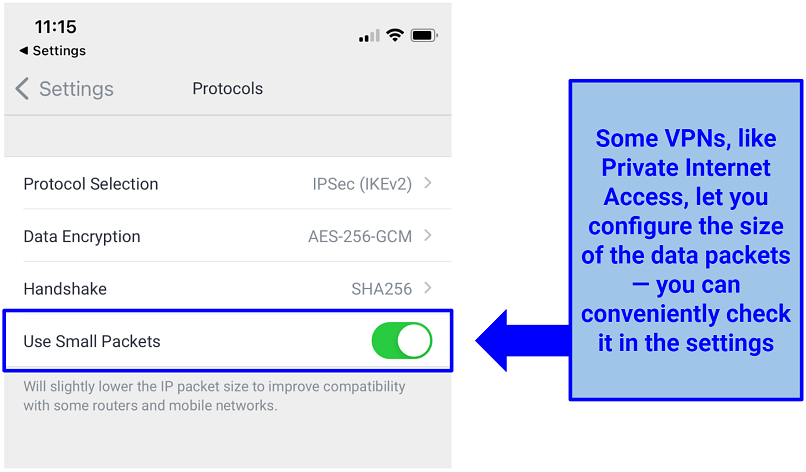 You can also change the encryption level to consume less cellular data
4. Additional Tips
Steer clear of free VPNs — they often consume more of your data allowance due to the ads they push through their service.
Additionally, features like obfuscation and double VPN provide extra layers of privacy, but they also increase data usage. Use these advanced features on cellular data only when it's absolutely essential. It’s also advisable to disable your VPN when it's not in use to conserve battery life and prevent accidental unnecessary data use.
Why You Need a VPN for Mobile Data
You expose yourself to potential security risks every time you use mobile data. The main issue is that mobile networks, like any other online connection, are susceptible to hackers and prying eyes. These malicious entities can eavesdrop on your actions, intercept data, or launch attacks against your device.
This is where a VPN comes into play. Imagine it as a secure tunnel for your data. When activated, a VPN encrypts your information, making it unreadable to outsiders. This encryption uses powerful algorithms and security protocols, ensuring that even if someone manages to intercept your data, they won't be able to decipher it.
Beyond security, VPNs serve another essential purpose for mobile data users. They can bypass geo-restrictions on content, letting you access websites or services unavailable in your region. What’s more, by masking your online activities, VPNs prevent some telecom providers from throttling your bandwidth in response to you using a lot of data, ensuring a smoother online experience. However, keep in mind that VPNs can’t be used to get around mobile data caps.
Tips on Choosing the Best VPN for Mobile Data Usage
All the VPNs I’ve listed above can help you stay safe online while using mobile data. They offer military-grade encryption, fast speeds, reliable servers, and beginner-friendly apps. However, if you want to run some tests yourself, here are the criteria I looked at:
- Minimal data usage. Choose a VPN that doesn’t increase data consumption by over 20%. Using this much data will quickly cause you to hit your data cap, leading to slow speeds and increased prices.
- Fast speeds. You need a VPN that offers impressive speeds to avoid lag or long loading times (any VPN with a speed drop of 50% or more isn’t good). The best VPNs will let you stream, browse, and download using mobile data without noticeable slowdowns.
- Strong security and privacy features. Choose a VPN with AES 256-bit encryption, a kill switch, and an audited no-logs policy to keep your online activity private and secure.
- Global server network. To access your favorite platforms and streaming services, pick a VPN with a reliable global server network. The best VPNs regularly rotate out blocked IP addresses for new ones.
- Dedicated smartphone apps. A user-friendly interface and an easy installation process across Android and iOS mean you don’t have to waste time fiddling with the VPN on your smartphone. It’s also a plus if the VPN of your choice comes with 24/7 live chat customer support.
- Trustworthy money-back guarantee. Make sure the service you’re choosing offers a tried-and-tested money-back guarantee. So, you can quickly get a refund if the VPN doesn’t meet your expectations.
Quick Guide: How to Use a VPN on Mobile Data in 3 Easy Steps
- Download a VPN.
- Connect to a server. Choose any server location to protect your data. Closeby servers offer faster speeds.
- Start browsing. Browse on mobile data securely and without restrictions.
FAQs
Why is my VPN not working on cellular data?
Your VPN might not be working on cellular data for various reasons, such as incorrect settings or issues present in the VPN app. First off, make sure you’re using a quality VPN that’s proven to work well with mobile data. If you already are, try the following fixes:
- No internet connection. Ensure you have an active cellular data connection. Data networks aren’t reliable at times, so it is possible you have temporarily lost connection.
- Outdated VPN app. Sometimes, the issue can be resolved by updating your VPN app to the latest version or reinstalling it.
- Server location mismatch. Ensure you're connected to a VPN server in a relevant location to the content you’re trying to access. For example, if you’re trying to watch UK Netflix, make sure you’re connected to a UK VPN server.
- IP and GPS location conflict. If the VPN's IP address doesn't match your phone's GPS location, some services may detect and block you. Try turning off location services and reconnecting.
- Protocol settings. Changing your VPN protocol through the app's settings can often resolve connection issues.
- Contact support. If all else fails, contact your VPN’s support team for assistance.
Does VPN work on 5G?
Yes, VPNs work on 5G, just like they do on 3G, 4G, and other network types. Just install the VPN on your phone and connect to a server to encrypt your 5G connection.
Does a VPN give you unlimited data?
No, a VPN will not give you unlimited mobile data. VPNs actually cause your connection to use slightly more data. That’s why it is important to choose a VPN that keeps the impact on data usage to a minimum.
Does using a VPN on my phone drain my battery?
Yes, a VPN may affect battery life due to the encryption process. That said, some VPNs, offer power-efficient protocols that mitigate battery drain.
Are cellular networks more secure than WiFi?
Cellular networks are generally more secure than public WiFi, but neither is 100% safe. Data networks usually feature some form of encryption on your connection, while many public WiFi networks are entirely insecure and have little to no encryption. Although data networks have some protection, it doesn’t make them immune to hackers. Always use a good VPN to secure your data connection further.
Will a VPN protect my SMS messages on cellular networks?
No, a VPN doesn't encrypt SMS messages. VPNs only encrypt your data traffic on the internet. However, many hackers tend to monitor and attack through internet connections, rather than SMS messages. That’s why VPNs are crucial to staying secure on both mobile data and WiFi connections.
Can I use a free VPN with mobile data?
Possibly, but using a free VPN with mobile data can be risky. These services usually lack the proper security measures, have slow speeds, and come with restrictive data caps. A premium VPN with a trustworthy money-back policy is a better alternative.
Some free VPNs may even log and sell your sensitive information to ad networks for a profit. Besides, free VPNs tend to consume more of your mobile data due to ads and inefficient protocols — the money you’d save choosing a free VPN would simply go into purchasing more data.
Use a VPN on Mobile Data in Minutes
It’s possible and recommended to use a VPN on mobile data. The VPN services listed above provide fast speeds, excellent security features, and global server networks to help you stay safe and bypass geo-restrictions from anywhere without interruptions. They also have mobile-friendly features to use less data and prevent quick battery drain.
About the Author
Husain Parvez is a former writer at vpnMentor, focusing on VPN reviews, detailed how-to guides, and hands-on tutorials. Husain was also a part of the vpnMentor Cybersecurity News bulletin and loved covering the latest events in cyberspace and data privacy.

Please, comment on how to improve this article. Your feedback matters!